Localization (Translation)

Solutions can easily be translated into any language by using the Text Locale property and creating a translation file with the translated text in Jigx Builder. On the device, use the Profile>Settings>Language option and select Device (Respects device settings). To understand how to configure localization in Jigx see Localization.

Adding dynamic values in localized jigs use ICU message definitions. Try it in the Online ICU Message Editor or see the ICU format messaging documentation.

Configuration options

Core structure

text Locale

  • id - provide a unique identifier for the property to be translated.

  • values - create context variables with values to use in the translation file. This is useful when creating dynamic content.

  • defaultMessage - If no translation is found for the active device's language, it will either fallback to the specified defaultMessage or, if one is not specified, to English.

Examples and code snippets

Form localized in five languages with static values

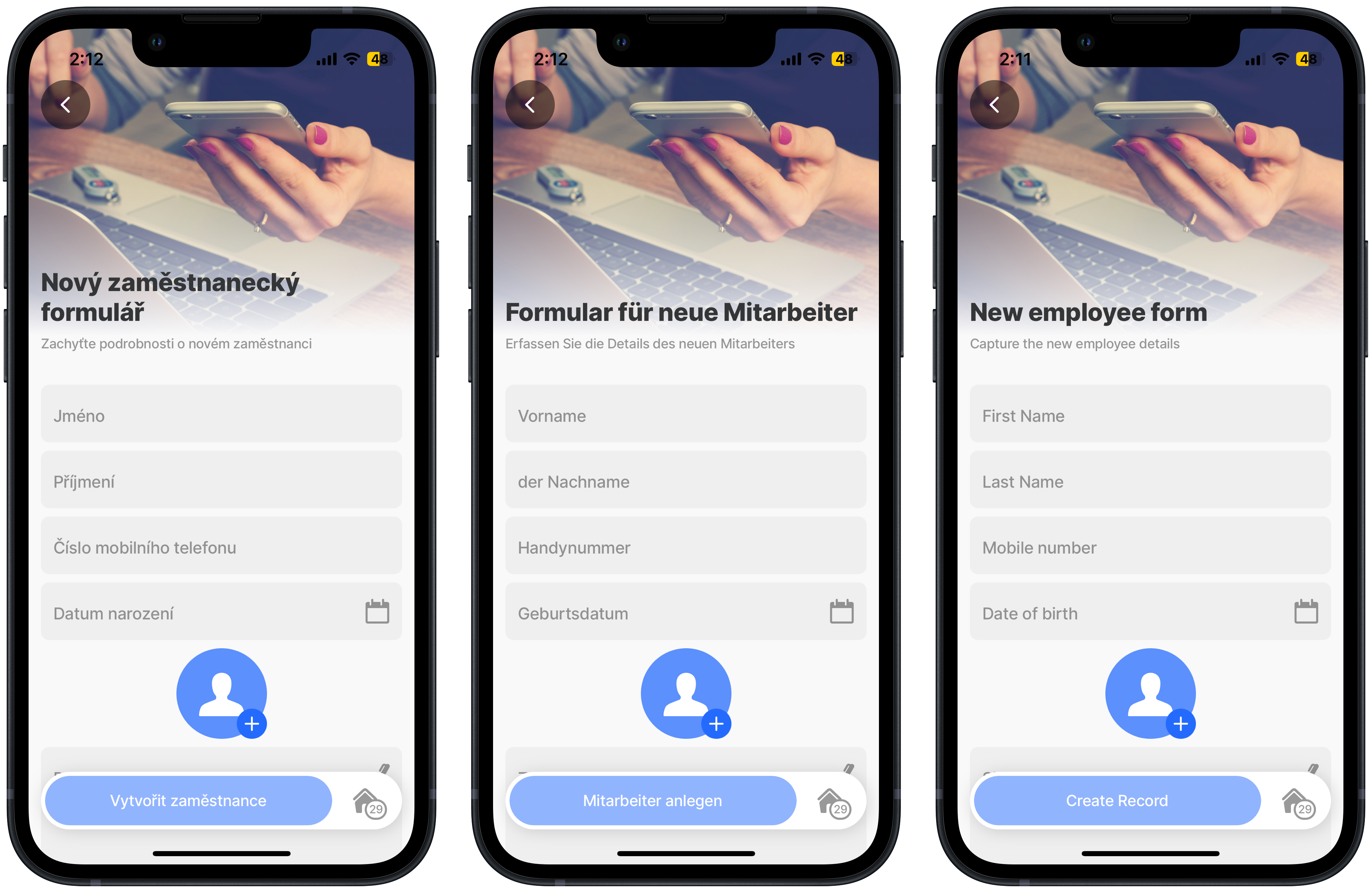
In this example, the new employee form is translated into German, French, and Czech. To see the form in each of the languages change your device language setting to one of the configured languages.

Examples: See the jig example in GitHub. See the translation file examples in GitHub.

Chez, German, English
title:
  id: title
  defaultMessage: New employee form
description: To view this jig in other languages, change your devices language settings to either German, French, or Czech
type: jig.default
icon: form

header:
  type: component.jig-header
  options:
    height: medium
    children:
      type: component.image
      options:
        source:
          uri: https://images.unsplash.com/photo-1423666639041-f56000c27a9a?q=80&w=2374&auto=format&fit=crop&ixlib=rb-4.0.3&ixid=M3wxMjA3fDB8MHxwaG90by1wYWdlfHx8fGVufDB8fHx8fA%3D%3D

children:
  - type: component.form
  # Used in the submit-form action to get context to the property instanceId.
    instanceId: form-employee 
    options:
      isDiscardChangesAlertEnabled: false
      children:
        - type: component.text-field
          instanceId: first_name # becomes the name of the column in table
          options:
            label:
              id: first_name
              defaultMessage: First Name

        - type: component.text-field
          instanceId: last_name # becomes the name of the column in table
          options:
            label:
              id: last_name
              defaultMessage: Last Name

        - type: component.number-field
          instanceId: contact_number # becomes the name of the column in table
          options:
            label:
              id: contact_number
              defaultMessage: Mobile number

        - type: component.date-picker
          instanceId: date_of_birth # becomes the name of the column in table
          options:
            label:
              id: date_of_birth
              defaultMessage: Date of birth

        - type: component.avatar-field
          instanceId: photo # becomes the name of the column in table
          options:
            label:
              id: photo
              defaultMessage: My profile

        - type: component.signature-field
          instanceId: signature # becomes the name of the column in table
          options:
            label:
              id: signature
              defaultMessage: Sign

        - type: component.email-field
          instanceId: email # becomes the name of the column in table
          options:
            label:
              id: email
              defaultMessage: Email address

actions:
  - children:
      - type: action.execute-entity
        options:
          title:
            id: create
            defaultMessage: Create Record
          provider: DATA_PROVIDER_DYNAMIC
          entity: default/employees
          method: create
          data:
            first_name: [email protected]_name.state.value
            last_name: [email protected]_name.state.value
            contact_number: [email protected]_number.state.value
            date_of_birth: [email protected]_of_birth.state.value
            photo: [email protected]
            signature: [email protected]
            email: [email protected]
          onSuccess:
            type: action.go-back

Jig translated into German with dynamic values

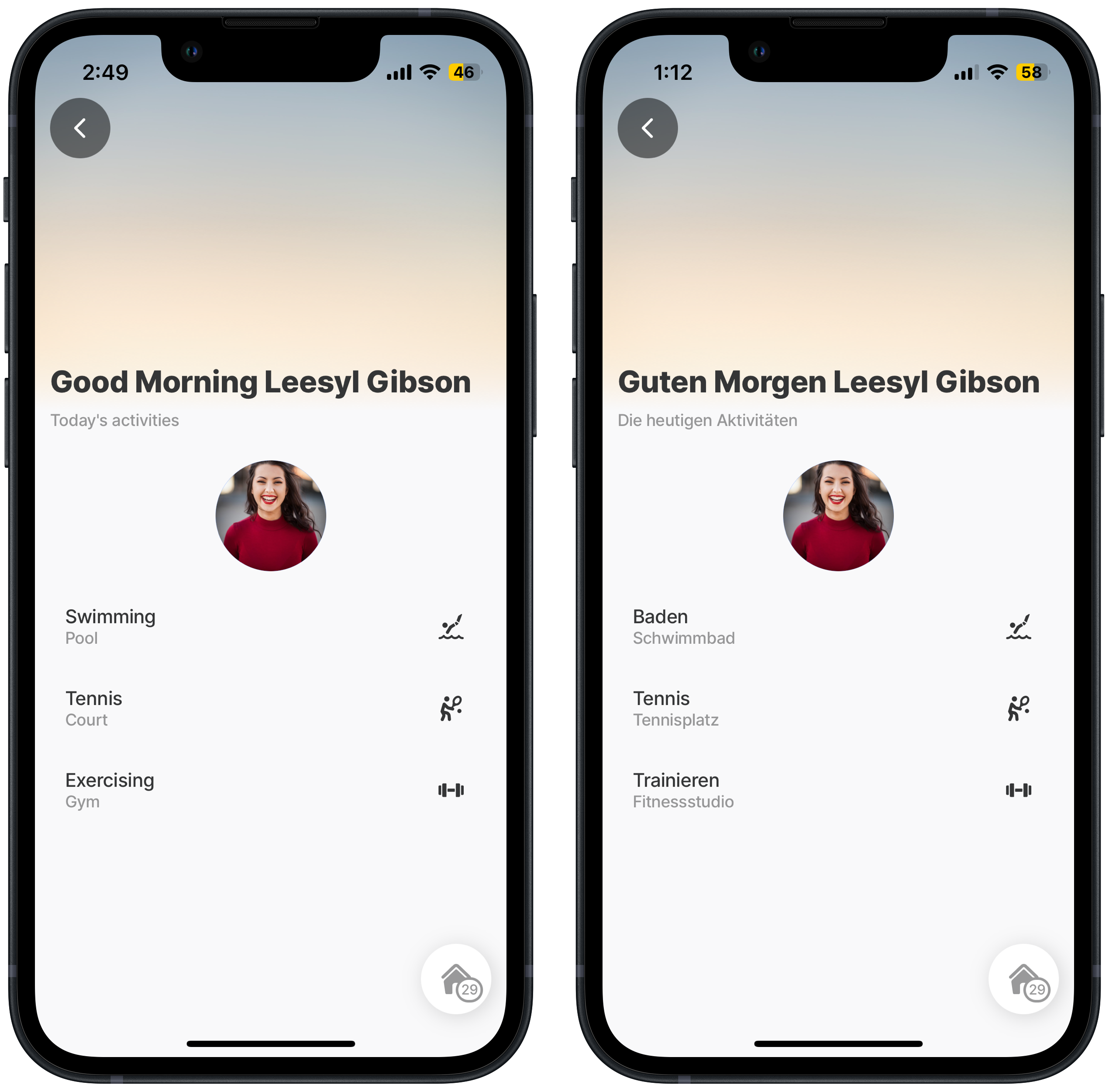
In this example, a jigwith today's activites is translated into German. The translation is configured dynamically agains the Text Locale values. To see the form in each of the languages change your device language setting to one of the configured languages.

One jig in two languages

Examples: See the jig example in GitHub. See the translation file examples in GitHub.

title:
  id: greeting
  values:
    name: [email protected]
    time: =$fromMillis($millis(),'[P]')
  defaultMessage: ="Welcome " & @ctx.user.displayName
description:
  id: activities
  defaultMessage: Today's activities
type: jig.default

header:
  type: component.jig-header
  options:
    height: medium
    children:
      type: component.image
      options:
        source:
          uri: https://images.unsplash.com/photo-1508614999368-9260051292e5?q=80&w=2940&auto=format&fit=crop&ixlib=rb-4.0.3&ixid=M3wxMjA3fDB8MHxwaG90by1wYWdlfHx8fGVufDB8fHx8fA%3D%3D

datasources:
  activities:
    type: datasource.static
    options:
      data:
        - id: 1
          name: Swimming
          location: Pool
          previewDetail: 7pm
          icon: swimming-diving
        - id: 2
          name: Tennis
          location: Court
          previewDetail: 6am
          icon: tennis-backhand
        - id: 3
          name: Exercising
          location: Gym
          previewDetail: 5pm
          icon: fitness-weights

children:
  - type: component.avatar
    options:
      title: profile
      size: large
      align: center
      uri: https://images.unsplash.com/photo-1494790108377-be9c29b29330?w=800&auto=format&fit=crop&q=60&ixlib=rb-4.0.3&ixid=M3wxMjA3fDB8MHxzZWFyY2h8NHx8YXZhdGFyJTIwd29tYW58ZW58MHx8MHx8fDA%3D

  - type: component.list
    options:
      data: [email protected]
      item:
        type: component.list-item
        options:
          title:
            id: sport
            values:
              name: [email protected]
          subtitle:
            id: venues
            values:
              location: [email protected]
          rightElement:
            element: icon
            icon: [email protected]

Last updated

Was this helpful?