> For the complete documentation index, see [llms.txt](https://docs.jigx.com/llms.txt). Markdown versions of documentation pages are available by appending `.md` to page URLs; this page is available as [Markdown](https://docs.jigx.com/examples/readme/preview/web-view.md).
# Web-view
The web-view component allows the user to use an URL or pass raw HTML as the preview content.
## Examples and code snippets
### Long-press on a widget
{% columns %}
{% column %}
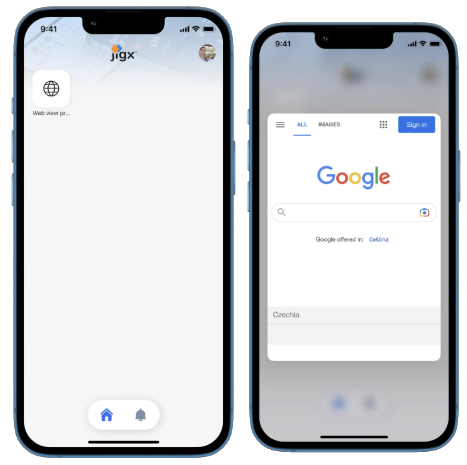
This example displays a preview after long-pressing the widget.
See the full example on [GitHub](https://github.com/jigx-com/jigx-docs-examples/blob/main/docs/Preview/%22https:/github.com/jigx-com/jigx-samples/blob/main/quickstart/jigx-samples/jigs/preview/web-view/web-longpress-widget.jigx).
{% endcolumn %}
{% column %}
{% endcolumn %}
{% endcolumns %}
{% tabs %}
{% tab title="long-press-on-widget" %}
```yaml
preview:
isCompact: false
children:
- type: component.web-view
options:
uri: https://www.google.com
isTrackingTransparencyRequired: true
height: 500
```
{% endtab %}
{% tab title="web-widget.jigx" %}
```yaml
children:
- type: component.grid
options:
children:
- type: component.grid-item
options:
size: "1x1"
children:
type: component.jig-widget
options:
jigId: long-press-on-widget
```
{% endtab %}
{% endtabs %}
### Long-press - onPress action
{% columns %}
{% column %}
{% endcolumn %}
{% column %}
{% endcolumn %}
{% endcolumns %}
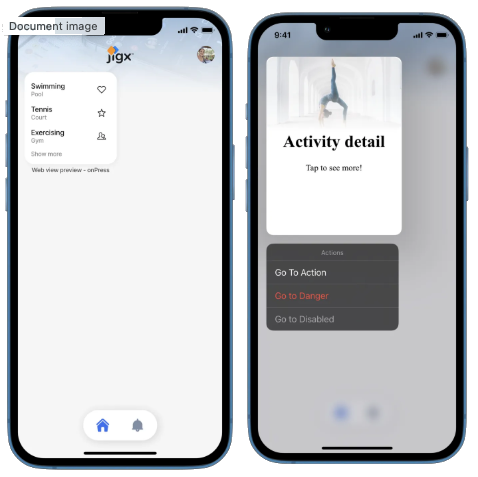
This example displays a preview after long-pressing the list-item on the widget.
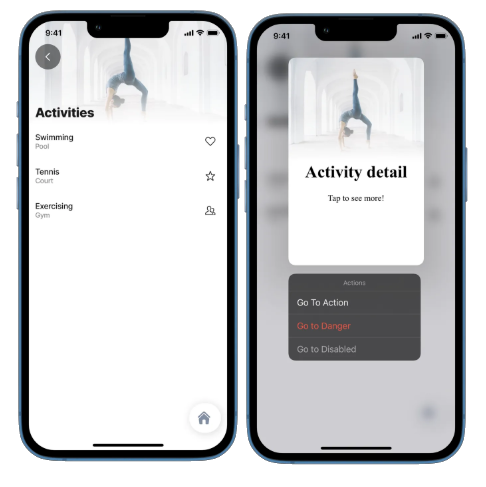
This example displays a preview after long-pressing the list-item in the jig. It includes the web-view component as well as the go-to actions.
As you can see in the code snippet, the original list doesn't include the preview. Our `onPress` action allows us to use the preview that is included in the detail jig.
See the full example of [web-longpress-onpress](https://github.com/jigx-com/jigx-samples/blob/main/quickstart/jigx-samples/jigs/preview/web-view/web-longpress-onPress.jigx) and [web-detail](https://github.com/jigx-com/jigx-samples/blob/main/quickstart/jigx-samples/jigs/preview/web-view/web-detail.jigx) on GitHub.
{% tabs %}
{% tab title="web-view-longpress-onPress" %}
```yaml
title: Web view preview - onPress
type: jig.list
icon: world
header:
type: component.jig-header
options:
height: small
children:
type: component.image
options:
title: Activities
source:
uri: https://images.unsplash.com/photo-1603988363607-e1e4a66962c6?ixlib=rb-4.0.3&ixid=MnwxMjA3fDB8MHxzZWFyY2h8Njl8fHNwb3J0fGVufDB8fDB8fA%3D%3D&auto=format&fit=crop&w=900&q=60
datasources:
activities:
type: datasource.static
options:
data:
- id: 1
name: Swimming
location: Pool
previewDetail: 7pm
image: love-it
- id: 2
name: Tennis
location: Court
previewDetail: 6am
image: rating-star
- id: 3
name: Exercising
location: Gym
previewDetail: 5pm
image: multiple-neutral-2
data: =@ctx.datasources.activities
item:
type: component.list-item
options:
title: =@ctx.current.item.name
subtitle: =@ctx.current.item.location
rightElement:
element: icon
icon: =@ctx.current.item.image
onPress:
type: action.go-to
options:
linkTo: web-detail
parameters:
id: =@ctx.current.item.id
name: =@ctx.current.item.name
location: =@ctx.current.item.location
previewDetail: =@ctx.current.item.previewDetail
```
{% endtab %}
{% tab title="web-detail" %}
```yaml
title: Activity detail
type: jig.default
header:
type: component.jig-header
options:
height: small
children:
type: component.image
options:
title: =@ctx.jig.inputs.name
source:
uri: https://images.unsplash.com/photo-1603988363607-e1e4a66962c6?ixlib=rb-4.0.3&ixid=MnwxMjA3fDB8MHxzZWFyY2h8Njl8fHNwb3J0fGVufDB8fDB8fA%3D%3D&auto=format&fit=crop&w=900&q=60
children:
- type: component.entity
options:
isCompact: true
children:
- type: component.entity-field
options:
label: Activity
value: =@ctx.jig.inputs.name
- type: component.entity-field
options:
label: Location
value: =@ctx.jig.inputs.location
- type: component.entity-field
options:
label: Time
value: =@ctx.jig.inputs.previewDetail
preview:
isCompact: true
actions:
- children:
- type: action.go-to
options:
title: Go To Action
linkTo: placeholder
- type: action.go-to
options:
title: Go to Danger
linkTo: placeholder
style:
isDanger: true
- type: action.go-to
options:
title: Go to Disabled
linkTo: placeholder
style:
isDisabled: true
children:
- type: component.web-view
options:
isTrackingTransparencyRequired: true
content: |
Activity detail
Tap to see more!
header:
type: component.jig-header
options:
height: medium
children:
type: component.image
options:
title: =@ctx.jig.inputs.name
subtitle: =@ctx.jig.inputs.location
source:
uri: https://images.unsplash.com/photo-1603988363607-e1e4a66962c6?ixlib=rb-4.0.3&ixid=MnwxMjA3fDB8MHxzZWFyY2h8Njl8fHNwb3J0fGVufDB8fDB8fA%3D%3D&auto=format&fit=crop&w=900&q=6
```
{% endtab %}
{% endtabs %}
---
# Agent Instructions
This documentation is published with GitBook. GitBook is the documentation platform designed so that both humans and AI agents can read, navigate, and reason over technical content effectively. Learn more at gitbook.com.
## Querying This Documentation
If you need additional information that is not directly available in this page, you can query the documentation by asking a question.
Perform an HTTP GET request on the following URL with the `ask` and `goal` query parameters:
```
GET https://docs.jigx.com/examples/readme/preview/web-view.md?ask=&goal=
```
`ask` is the immediate question: it should be specific, self-contained, and written in natural language.
`goal` is what the user is ultimately trying to achieve, the reason they need the answer. Sharing it helps GitBook give you a better, more relevant answer. A goal is most helpful when it describes the outcome the user wants rather than restating the question. For example, with `ask=how do I create an API token`, a goal like `automate deployments from our CI pipeline` lets GitBook tailor the answer to that use case.
The response will contain a direct answer to the question and relevant excerpts and sources from the documentation.
Use this mechanism when the answer is not explicitly present in the current page, you need clarification or additional context, or you want to retrieve related documentation sections.