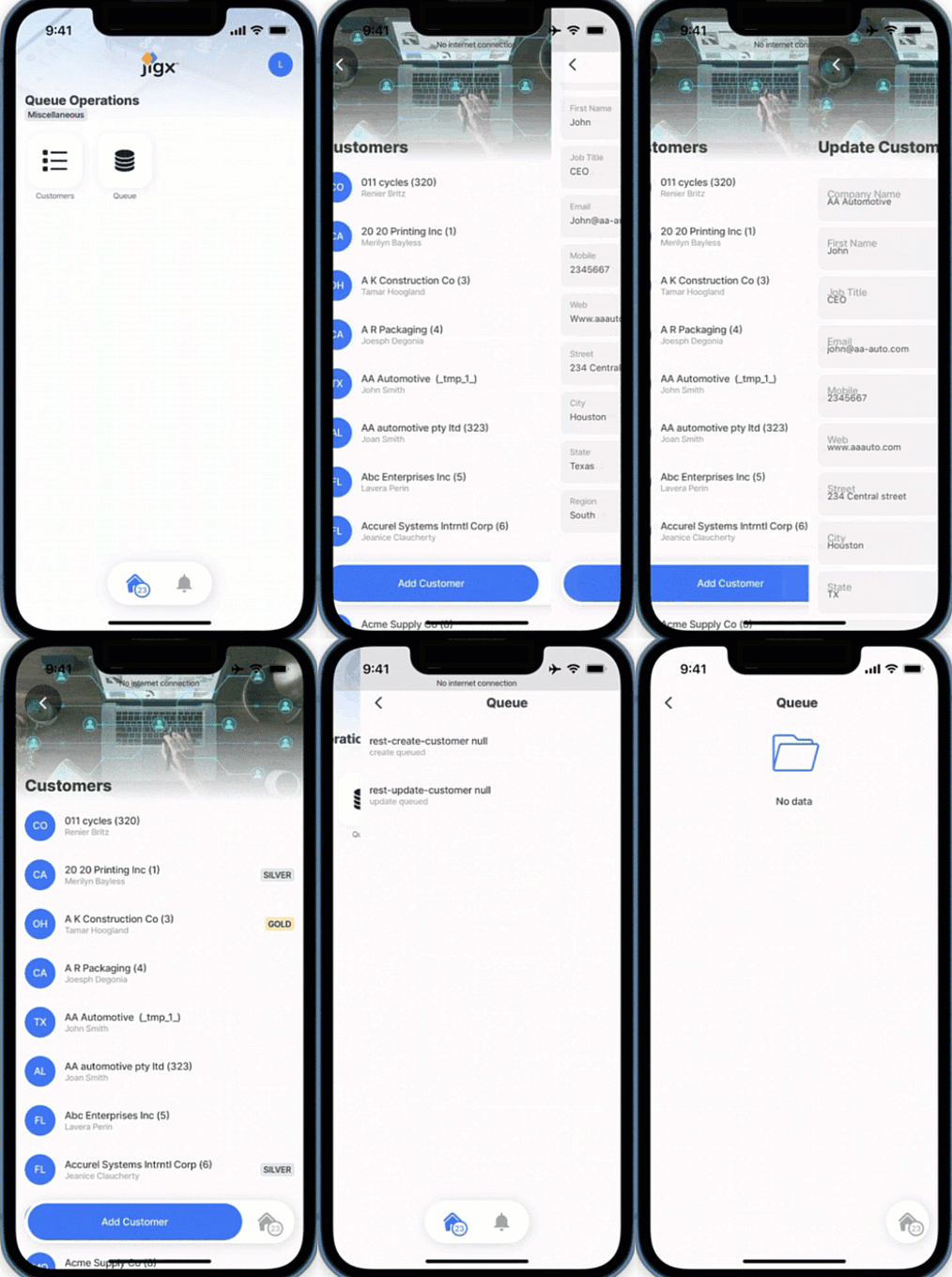
Offline remote data handling
Dealing with offline remote data is fundamental to ensuring data synchronization and consistency between the mobile app and the remote data source, allowing users to continue using the app and performing actions without interruption. Queue operations provide the functionality needed when the device regains network connectivity and manages a sequence of elements in a specific order. The commands in the queue can be manipulated to reduce the number of calls to the remote data store.
What happens to data when you are offline?
Data Capture Offline:
When the mobile app is offline, any actions that require remote data interaction, such as submitting a form, uploading a file, or syncing data, are queued.
Each action is captured and stored in a queue in the local data provider on the device.
Network Monitoring:
The app monitors the network status. It triggers the dequeuing process when it detects that the device has regained connectivity.
Dequeue and Sync:
The app starts processing the commands in the queue. It dequeues each command and attempts to send it to the remote server.
If the operation is successful, the app removes the command from the queue.
How to configure the queue
In the execute-entity, execute-entities , and submit-form actions, the queueOperation property is configured to determine how the record must be handled in the queue when the device is offline. There are two configuration options:
replace
All queued commands for the specified record and method type are replaced with the current action. For example, a record is created and then updated a few times. Using replace for the update method results in only two commands in the queue for the record: create and update. If replace is not used, there will be a command for every action: create, update, update, update. Replace is recommended for backend systems with rate limits. The queueOperation: replace requires an id (must be in lowercase). This can either be configured in the: Parameter of the execute-entity action with an id configured in the parameters of the function file. data property in the execute-entity action.
add
All commands are added to the queue. When the queueOperation property is omitted, the default is add.
actions:
- children:
- type: action.execute-entity
options:
title: Update Customer
provider: DATA_PROVIDER_REST
entity: customers
method: update
# Use replace to ensure you only have one update on the queue related
# to a record. Not adding the replace will not break the solution but
# will help to avoid chattiness and scenarios where backends have
# rate limits.
queueOperation: replace
function: rest-update-customer
# Parameters to update in the remote server.
parameters:
# id is a required property for the replace queue
id: [email protected]
firstName: [email protected]
lastName: [email protected]
companyName: [email protected]
address: [email protected]
city: [email protected]
email: =$lowercase(@ctx.components.email.state.value)
# Data records to update in the local SQLite table.
data:
id: [email protected]
firstName: [email protected]
lastName: [email protected]
companyName: [email protected]
address: [email protected]
city: [email protected]
email: =$lowercase(@ctx.components.email.state.value)actions:
- children:
- type: action.execute-entity
options:
title: Update Customer
provider: DATA_PROVIDER_REST
entity: customers
method: update
# Using add will add a command for every update to the queue related
# to a record. Using add can be cumbersome and costly for scenarios
# where backends have rate limits.
queueOperation: add
goBack: previous
function: rest-update-customer
# Parameters to update in the remote server.
parameters:
# id is a required property for the replace queue
id: [email protected]
firstName: [email protected]
lastName: [email protected]
companyName: [email protected]
address: [email protected]
city: [email protected]
email: =$lowercase(@ctx.components.email.state.value)
# Data records to update in the local SQLite table.
data:
id: [email protected]
firstName: [email protected]
lastName: [email protected]
companyName: [email protected]
address: [email protected]
city: [email protected]
email: =$lowercase(@ctx.components.email.state.value) Examples of configuring the required id property when using queueOperation: replace.
# This action is configured with a replace queue operation and the id is
# specified, in the data property. The id comes from an input.
actions:
- children:
- type: action.execute-entity
options:
title: Update Customer
provider: DATA_PROVIDER_REST
entity: customers
method: update
function: rest-update-customer
# Replace current update on the queue.
queueOperation: replace
# id is required for the replace operation.
parameters:
id: [email protected]
firstName: [email protected]
lastName: [email protected]
companyName: [email protected]
address: [email protected]
city: [email protected]
customerType: [email protected]
email: =$lowercase(@ctx.components.email.state.value)
# id is required for the replace operation.
data:
id: [email protected]
firstName: [email protected]
lastName: [email protected]
companyName: [email protected]
address: [email protected]
city: [email protected]
customerType: [email protected]
email: =$lowercase(@ctx.components.email.state.value)# This action is configured with a replace queue operation and the id is specified,
# in the paramaters property.
# The id is specified in the function file under parameters.
actions:
- children:
- type: action.execute-entity
options:
title: Update Customer
provider: DATA_PROVIDER_REST
entity: customers
method: update
# Use replace to ensure you only have one update on the queue related
# to a record.
# Not adding the replace will not break the solution but will help
# to avoid chattiness and scenarios where backends have rate limits.
queueOperation: replace
goBack: previous
function: rest-update-customer
parameters:
# id is a required property for the replace queue
id: [email protected]
firstName: [email protected]
lastName: [email protected]
companyName: [email protected]
address: [email protected]
city: [email protected]
email: =$lowercase(@ctx.components.email.state.value)
data:
# id is a required property for the replace queue
id: [email protected]
firstName: [email protected]
lastName: [email protected]
companyName: [email protected]
address: [email protected]
city: [email protected]
email: =$lowercase(@ctx.components.email.state.value) How to clear the queue
For scenarios where operations on a record must be treated as draft and all queued commands must be removed without impacting the local record, use the clear-queue action, and specify the id of the record and a title for the action. See clear all commands in the queue example.
actions:
- children:
- type: action.clear-queue
options:
title: Remove record from Queue
id: [email protected]Queue handling for delete methods
When using the replace property with a delete method, all commands on the queue for the specified record are removed. The delete method will still delete the local entity record as expected, for example while offline a record is created with a tempId, then updated, and then deleted with a queueOperations: replace, the commands for that record are removed from the queue and local entity will also be deleted. This avoids the need for the full cycle of calls to be sent to the backend (create, update, delete) if the end result is that the record is deleted.
If the record to be delete has a valid Id then the queueOperations: add is used to add the record to the queue, when the device is back online the queue is processed and the record is deleted using the function.
If you want to cater for both tempId and a valid Id records when offline in one queueOperation configuration use the following expression =$isTempId(@ctx.current.item.id) ? replace:add
actions:
- children:
- type: action.execute-entity
options:
title: Delete Record
provider: DATA_PROVIDER_REST
entity: customers
method: delete
# For delete use an expression to evaluate if there is a valid or
# tempId. If the record has a tempId it will remove all operations
# related to the record from the queue. If it is a valid Id the record
# will use the add and place it on the queue, which will delete the
# record from the remote data store using the function.
queueOperation: =$isTempId(@ctx.current.item.id) ? replace:add
function: rest-delete-customer
parameters:
custId: =$number(@ctx.current.item.id)
data:
id: [email protected]Handling TempIds
All tempIds for a record are replaced in all other queued commands if a valid id is returned. If you use a record's id in another record while offline and a valid id is returned back when the device is back online, Jigx updates the tempId used in all the other records that used it with the valid id. This makes for smoother integration with backend systems as the ids will match up. See working with REST ids for more information on returning the id.
Examples and code snippets
Execute-entity with queueOperation (replace)
In this example, when the device is offline and a customer record is created and then updated multiple times, only one create and one update command is queued. When the device is back online the queue is cleared. The remote data store returns an id that we can use to map back to the record locally in the outputTransform of the function (rest-create-customer). queueOperation is not required for the create of the customer because once the device comes online, the record will be created, and the id from the remote data store will be returned and any records with the same tempId will be updated with the returning id and will update the correct record. The queueOperation: replace is rather used in the update-customer jig.

title: New Customer
type: jig.default
header:
type: component.jig-header
options:
height: small
children:
type: component.image
options:
source:
uri: https://www.dropbox.com/scl/fi/ha9zh6wnixblrbubrfg3e/business-5475661_640.jpg?rlkey=anemjh5c9qsspvzt5ri0i9hva&raw=1
onFocus:
type: action.reset-state
options:
state: [email protected]
datasources:
region:
type: datasource.sqlite
options:
provider: DATA_PROVIDER_LOCAL
entities:
- entity: us-states
query: |
SELECT
uss.id AS id,
json_extract(uss.data, '$.state') AS state,
json_extract(uss.data, '$.abbreviation') AS abbreviation,
json_extract(uss.data, '$.stateCapital') AS stateCapital,
json_extract(uss.data, '$.region') AS region,
json_extract(uss.data, '$.flag') AS flag
FROM
[us-states] AS uss
WHERE
json_extract(uss.data, '$.abbreviation') = @selectedState
queryParameters:
selectedState: [email protected]
customerType:
type: datasource.static
options:
data:
- id: 1
type: New
value: new
- id: 2
type: Gold
value: Gold
- id: 3
type: Silver
value: Silver
children:
- type: component.form
instanceId: customerForm
options:
isDiscardChangesAlertEnabled: false
children:
- type: component.text-field
instanceId: companyName
options:
label: Company Name
- type: component.field-row
options:
children:
- type: component.text-field
instanceId: firstName
options:
label: First Name
- type: component.text-field
instanceId: lastName
options:
label: Last Name
- type: component.text-field
instanceId: jobTitle
options:
label: Job Title
- type: component.text-field
instanceId: email
options:
label: Email
- type: component.text-field
instanceId: phone1
options:
label: Mobile
- type: component.text-field
instanceId: web
options:
label: Web
- type: component.text-field
instanceId: address
options:
label: Street
- type: component.text-field
instanceId: city
options:
label: City
- type: component.field-row
options:
children:
- type: component.dropdown
instanceId: usState
options:
label: State
data: [email protected]
item:
type: component.dropdown-item
options:
title: [email protected]
value: [email protected]
leftElement:
element: avatar
text: [email protected]
uri: [email protected]
- type: component.text-field
instanceId: zip
options:
label: ZIP
- type: component.field-row
options:
children:
- type: component.text-field
instanceId: region
options:
label: Region
value: [email protected]
- type: component.dropdown
instanceId: customerType
options:
label: Customer Type
data: [email protected]
item:
type: component.dropdown-item
options:
title: [email protected]
value: [email protected]
actions:
- children:
- type: action.execute-entity
options:
title: Create Customer
provider: DATA_PROVIDER_REST
entity: customers
method: create
# In this scenario, the backend system returns an Id that we can use
# to map back to the record locally in the Output transform of the
# function (rest-create-customer). You don’t need to use
# queueOperation in this scenario. Once the device goes online,
# the record will be created, and the id from the backend will come
# back. Any records with the same tempId will be updated with
# the returning id and will update the correct record.
function: rest-create-customer
parameters:
firstName: [email protected]
lastName: [email protected]
companyName: [email protected]
address: [email protected]
city: [email protected]
customerType: [email protected]
email: =$lowercase(@ctx.components.email.state.value)
jobTitle: [email protected]
phone1: [email protected]
phone2: [email protected]
region: [email protected]
state: [email protected]
web: =$lowercase(@ctx.components.web.state.value)
zip: [email protected]
data:
firstName: [email protected]
lastName: [email protected]
companyName: [email protected]
address: [email protected]
city: [email protected]
customerType: [email protected]
email: =$lowercase(@ctx.components.email.state.value)
jobTitle: [email protected]
phone1: [email protected]
phone2: [email protected]
region: [email protected]
state: [email protected]
web: =$lowercase(@ctx.components.web.state.value)
zip: [email protected] title: Update Customer
type: jig.default
header:
type: component.jig-header
options:
height: small
children:
type: component.image
options:
source:
uri: https://www.dropbox.com/scl/fi/ha9zh6wnixblrbubrfg3e/business-5475661_640.jpg?rlkey=anemjh5c9qsspvzt5ri0i9hva&raw=1
datasources:
region:
type: datasource.static
options:
data:
- id: 1
region: US Central
- id: 2
region: US East
- id: 3
region: US West
customerType:
type: datasource.static
options:
data:
- id: 1
type: New
value:
- id: 2
type: Gold
value: Gold
- id: 3
type: Silver
value: Silver
customers:
type: datasource.sqlite
options:
provider: DATA_PROVIDER_LOCAL
entities:
- entity: customers
query: |
SELECT
cus.id AS id,
json_extract(cus.data, '$.firstName') AS firstName,
json_extract(cus.data, '$.lastName') AS lastName,
json_extract(cus.data, '$.companyName') AS companyName,
json_extract(cus.data, '$.address') AS address,
json_extract(cus.data, '$.city') AS city,
json_extract(cus.data, '$.state') AS state,
json_extract(cus.data, '$.zip') AS zip,
json_extract(cus.data, '$.phone1') AS phone1,
json_extract(cus.data, '$.phone2') AS phone2,
json_extract(cus.data, '$.email') AS email,
json_extract(cus.data, '$.web') AS web,
json_extract(cus.data, '$.customerType') AS customerType,
json_extract(cus.data, '$.jobTitle') AS jobTitle,
json_extract(cus.data, '$.region') AS region
FROM
[customers] AS cus
WHERE id = @custId
queryParameters:
custId: [email protected]
isDocument: true
children:
- type: component.form
instanceId: customer
options:
isDiscardChangesAlertEnabled: false
children:
- type: component.text-field
instanceId: companyName
options:
label: Company Name
initialValue: [email protected]
- type: component.field-row
options:
children:
- type: component.text-field
instanceId: firstName
options:
label: First Name
initialValue: [email protected]
- type: component.text-field
instanceId: lastName
options:
label: Last Name
initialValue: [email protected]
- type: component.text-field
instanceId: jobTitle
options:
label: Job Title
initialValue: [email protected]
- type: component.text-field
instanceId: email
options:
label: Email
initialValue: [email protected]
- type: component.text-field
instanceId: phone1
options:
label: Mobile
initialValue: [email protected]
- type: component.text-field
instanceId: web
options:
label: Web
initialValue: [email protected]
- type: component.text-field
instanceId: address
options:
label: Street
initialValue: [email protected]
- type: component.text-field
instanceId: city
options:
label: City
initialValue: [email protected]
- type: component.field-row
options:
children:
- type: component.text-field
instanceId: state
options:
label: State
initialValue: [email protected]
- type: component.text-field
instanceId: zip
options:
label: ZIP
initialValue: [email protected]
- type: component.field-row
options:
children:
- type: component.dropdown
instanceId: region
options:
label: Region
data: [email protected]
initialValue: [email protected]
item:
type: component.dropdown-item
options:
title: [email protected]
value: [email protected]
- type: component.dropdown
instanceId: customerType
options:
label: Customer Type
data: [email protected]
initialValue: [email protected]
item:
type: component.dropdown-item
options:
title: [email protected]
value: [email protected]
actions:
- children:
- type: action.execute-entity
options:
title: Update Customer
provider: DATA_PROVIDER_REST
entity: customers
method: update
# Use replace to ensure you only have one update on the queue related
# to a record. Not doing this will not break the solution but will
# help to avoid chattiness and scenarios where backends have rate limits
queueOperation: replace
goBack: previous
function: rest-update-customer
parameters:
# id is a required parameter when using the queueOperation: replace
id: [email protected]
firstName: [email protected]
lastName: [email protected]
companyName: [email protected]
address: [email protected]
city: [email protected]
customerType: [email protected]
email: =$lowercase(@ctx.components.email.state.value)
jobTitle: [email protected]
phone1: [email protected]
phone2: [email protected]
region: [email protected]
state: [email protected]
web: =$lowercase(@ctx.components.web.state.value)
zip: [email protected]
data:
# id is a required when using the queueOperation: replace
id: [email protected]
firstName: [email protected]
lastName: [email protected]
companyName: [email protected]
address: [email protected]
city: [email protected]
customerType: [email protected]
email: =$lowercase(@ctx.components.email.state.value)
jobTitle: [email protected]
phone1: [email protected]
phone2: [email protected]
region: [email protected]
state: [email protected]
web: =$lowercase(@ctx.components.web.state.value)
zip: [email protected] provider: DATA_PROVIDER_REST
# Create new record in the backend
method: POST
# Use your REST service URL
url: https://[your_rest_service]/api/customers
# Direct the function call to use local execution between the mobile device
# and the REST service.
useLocalCall: true
parameters:
accessToken:
location: header
required: true
type: string
# Use manage.jigx.com to define credentials for your solution.
firstName:
value: service.oauth
type: string
location: body
required: true
lastName:
type: string
location: body
required: true
companyName:
type: string
location: body
required: true
address:
type: string
location: body
required: false
city:
type: string
location: body
required: false
state:
type: string
location: body
required: false
zip:
type: string
location: body
required: false
phone1:
type: string
location: body
required: false
phone2:
type: string
location: body
required: false
email:
type: string
location: body
required: false
web:
type: string
location: body
required: false
region:
type: string
location: body
required: false
customerType:
type: string
location: body
required: false
jobTitle:
type: string
location: body
required: false
inputTransform: |
{
"firstName": firstName,
"lastName": lastName,
"companyName": companyName,
"address": address,
"city": city,
"state": state,
"zip": zip,
"phone1": phone1,
"phone2": phone2,
"email": email,
"web": web,
"region": region,
"customerType": customerType,
"jobTitle": jobTitle
}
# In this scenario, the backend system returns an ID that we can use to map
# back to the record locally in the Output transform of the function
# (rest-create-customer). You don’t need to use queueOperation in this scenario
# for Create. Once the device goes online, the record will be created, and the
# ID from the backend will come back. Any records with the same tempId will be
# updated with the returning ID and will update the correct record.
outputTransform: |
{
"id": custId,
"status": status
}provider: DATA_PROVIDER_REST
method: PUT
#Use your REST service URL
url: https://[your_rest_service]/api/customers
# Direct the function call to use local execution between the mobile device and the
# REST service.
useLocalCall: true
format: text
parameters:
accessToken:
location: header
required: true
type: string
# Use manage.jigx.com to define credentials for your solution.
value: service.oauth
# id is a required property when using the queueOperation: replace.
id:
type: int
location: body
required: true
firstName:
type: string
location: body
required: true
lastName:
type: string
location: body
required: true
companyName:
type: string
location: body
required: true
address:
type: string
location: body
required: false
city:
type: string
location: body
required: false
state:
type: string
location: body
required: false
zip:
type: string
location: body
required: false
phone1:
type: string
location: body
required: false
phone2:
type: string
location: body
required: false
email:
type: string
location: body
required: false
web:
type: string
location: body
required: false
region:
type: string
location: body
required: false
customerType:
type: string
location: body
required: false
jobTitle:
type: string
location: body
required: false
inputTransform: |
{
"custId": id,
"firstName": firstName,
"lastName": lastName,
"companyName": companyName,
"address": address,
"city": city,
"state": state,
"zip": zip,
"phone1": phone1,
"phone2": phone2,
"email": email,
"web": web,
"region": region,
"customerType": customerType,
"jobTitle": jobTitle
}Execute-entity with queueOperation (add)
In this example, when the device is offline and a customer record is updated multiple times , all the update commands are queued. When the device is back online the queue is cleared.
title: Update Customer
type: jig.default
header:
type: component.jig-header
options:
height: small
children:
type: component.image
options:
source:
uri: https://www.dropbox.com/scl/fi/ha9zh6wnixblrbubrfg3e/business-5475661_640.jpg?rlkey=anemjh5c9qsspvzt5ri0i9hva&raw=1
datasources:
region:
type: datasource.static
options:
data:
- id: 1
region: US Central
- id: 2
region: US East
- id: 3
region: US West
customerType:
type: datasource.static
options:
data:
- id: 1
type: New
value:
- id: 2
type: Gold
value: Gold
- id: 3
type: Silver
value: Silver
customers:
type: datasource.sqlite
options:
provider: DATA_PROVIDER_LOCAL
entities:
- entity: customers
query: |
SELECT
cus.id AS id,
json_extract(cus.data, '$.firstName') AS firstName,
json_extract(cus.data, '$.lastName') AS lastName,
json_extract(cus.data, '$.companyName') AS companyName,
json_extract(cus.data, '$.address') AS address,
json_extract(cus.data, '$.city') AS city,
json_extract(cus.data, '$.state') AS state,
json_extract(cus.data, '$.zip') AS zip,
json_extract(cus.data, '$.phone1') AS phone1,
json_extract(cus.data, '$.phone2') AS phone2,
json_extract(cus.data, '$.email') AS email,
json_extract(cus.data, '$.web') AS web,
json_extract(cus.data, '$.customerType') AS customerType,
json_extract(cus.data, '$.jobTitle') AS jobTitle,
json_extract(cus.data, '$.region') AS region
FROM
[customers] AS cus
WHERE id = @custId
queryParameters:
custId: [email protected]
isDocument: true
children:
- type: component.form
instanceId: customer
options:
isDiscardChangesAlertEnabled: false
children:
- type: component.text-field
instanceId: companyName
options:
label: Company Name
initialValue: [email protected]
- type: component.field-row
options:
children:
- type: component.text-field
instanceId: firstName
options:
label: First Name
initialValue: [email protected]
- type: component.text-field
instanceId: lastName
options:
label: Last Name
initialValue: [email protected]
- type: component.text-field
instanceId: jobTitle
options:
label: Job Title
initialValue: [email protected]
- type: component.text-field
instanceId: email
options:
label: Email
initialValue: [email protected]
- type: component.text-field
instanceId: phone1
options:
label: Mobile
initialValue: [email protected]
- type: component.text-field
instanceId: web
options:
label: Web
initialValue: [email protected]
- type: component.text-field
instanceId: address
options:
label: Street
initialValue: [email protected]
- type: component.text-field
instanceId: city
options:
label: City
initialValue: [email protected]
- type: component.field-row
options:
children:
- type: component.text-field
instanceId: state
options:
label: State
initialValue: [email protected]
- type: component.text-field
instanceId: zip
options:
label: ZIP
initialValue: [email protected]
- type: component.field-row
options:
children:
- type: component.dropdown
instanceId: region
options:
label: Region
data: [email protected]
initialValue: [email protected]
item:
type: component.dropdown-item
options:
title: [email protected]
value: [email protected]
- type: component.dropdown
instanceId: customerType
options:
label: Customer Type
data: [email protected]
initialValue: [email protected]
item:
type: component.dropdown-item
options:
title: [email protected]
value: [email protected]
actions:
- children:
- type: action.execute-entity
options:
title: Update Customer
provider: DATA_PROVIDER_REST
entity: customers
method: update
# Use add to queue all the updates related to a record.
queueOperation: add
function: rest-update-customer
parameters:
id: [email protected]
firstName: [email protected]
lastName: [email protected]
companyName: [email protected]
address: [email protected]
city: [email protected]
customerType: [email protected]
email: =$lowercase(@ctx.components.email.state.value)
jobTitle: [email protected]
phone1: [email protected]
phone2: [email protected]
region: [email protected]
state: [email protected]
web: =$lowercase(@ctx.components.web.state.value)
zip: [email protected]
data:
id: [email protected]
firstName: [email protected]
lastName: [email protected]
companyName: [email protected]
address: [email protected]
city: [email protected]
customerType: [email protected]
email: =$lowercase(@ctx.components.email.state.value)
jobTitle: [email protected]
phone1: [email protected]
phone2: [email protected]
region: [email protected]
state: [email protected]
web: =$lowercase(@ctx.components.web.state.value)
zip: [email protected] provider: DATA_PROVIDER_REST
method: PUT
# Use your REST service URL
url: https://[your_rest_service]/api/customers
# Direct the function call to use local execution between the mobile device
# and the REST service.
format: text
useLocalCall: true
parameters:
accessToken:
location: header
required: true
type: string
# Use manage.jigx.com to define credentials.
value: service.oauth
id:
type: int
location: body
required: true
firstName:
type: string
location: body
required: true
lastName:
type: string
location: body
required: true
companyName:
type: string
location: body
required: true
address:
type: string
location: body
required: false
city:
type: string
location: body
required: false
state:
type: string
location: body
required: false
zip:
type: string
location: body
required: false
phone1:
type: string
location: body
required: false
phone2:
type: string
location: body
required: false
email:
type: string
location: body
required: false
web:
type: string
location: body
required: false
region:
type: string
location: body
required: false
customerType:
type: string
location: body
required: false
jobTitle:
type: string
location: body
required: false
inputTransform: |
{
"custId": id,
"firstName": firstName,
"lastName": lastName,
"companyName": companyName,
"address": address,
"city": city,
"state": state,
"zip": zip,
"phone1": phone1,
"phone2": phone2,
"email": email,
"web": web,
"region": region,
"customerType": customerType,
"jobTitle": jobTitle
}Execute-entity (delete) with queueOperation (replace)
In this example, when the device is offline and a customer record is updated multiple times and then deleted, all the the commands for the record are removed from the queue and local entity is deleted. When the device is back online the queue is cleared.
title: Customers
type: jig.list
icon: list
header:
type: component.jig-header
options:
height: small
children:
type: component.image
options:
source:
uri: https://www.dropbox.com/scl/fi/ha9zh6wnixblrbubrfg3e/business-5475661_640.jpg?rlkey=anemjh5c9qsspvzt5ri0i9hva&raw=1
onRefresh:
type: action.execute-action
options:
action: load-customers
datasources:
customers:
type: datasource.sqlite
options:
provider: DATA_PROVIDER_LOCAL
entities:
- entity: customers
query: |
SELECT
cus.id AS id,
json_extract(cus.data, '$.firstName') AS firstName,
json_extract(cus.data, '$.lastName') AS lastName,
json_extract(cus.data, '$.companyName') AS companyName,
json_extract(cus.data, '$.address') AS address,
json_extract(cus.data, '$.city') AS city,
json_extract(cus.data, '$.state') AS state,
json_extract(cus.data, '$.zip') AS zip,
json_extract(cus.data, '$.phone1') AS phone1,
json_extract(cus.data, '$.phone2') AS phone2,
json_extract(cus.data, '$.email') AS email,
json_extract(cus.data, '$.web') AS web,
json_extract(cus.data, '$.customerType') AS customerType,
json_extract(cus.data, '$.jobTitle') AS jobTitle,
json_extract(cus.data, '$.logo') AS logo
FROM
[customers] AS cus
-- ORDER BY
-- json_extract(cus.data, '$.companyName')
data: [email protected]
item:
type: component.list-item
options:
title: [email protected] & ' (' & @ctx.current.item.id & ')'
subtitle: [email protected] & ' ' & @ctx.current.item.lastName
leftElement:
element: avatar
text: [email protected]
uri: [email protected]
label:
title: |
=$uppercase((@ctx.current.item.customerType = 'Silver' ? @ctx.current.item.customerType:@ctx.current.item.customerType = 'Gold' ? @ctx.current.item.customerType:''))
color:
- when: [email protected] = 'Gold'
color: color3
- when: [email protected] = 'Silver'
color: color14
onPress:
type: action.go-to
options:
linkTo: update-customer
parameters:
customer: [email protected]
swipeable:
left:
- label: DELETE
icon: delete-2
color: negative
onPress:
type: action.confirm
options:
isConfirmedAutomatically: false
onConfirmed:
type: action.execute-entity
options:
provider: DATA_PROVIDER_REST
entity: customers
method: delete
# For delete use replace, If the record has tempId it will
# remove all opperations related to the record from the queue
queueOperation: replace
function: rest-delete-customer
parameters:
custId: =$number(@ctx.current.item.id)
data:
id: [email protected]
modal:
title: Are you sure?
description: |
=('Press Confirm to permanently delete ' & @ctx.current.item.companyName)provider: DATA_PROVIDER_REST
method: DELETE
# Use your REST service URL
url: https://[your_rest_service]/api/customers?id={custId}
# Direct the function call to use local execution between the mobile device
# and the REST service.
format: text
useLocalCall: true
parameters:
accessToken:
location: header
required: true
type: string
# Use manage.jigx.com to define credentials for your solution.
value: service.oauth
custId:
type: int
location: query
required: trueExecute-entity with queueOperations when no id is returned
In this example, the remote data store does not return an id, and we need to sync the data before we get the correct backend id for the record. We need to be careful not to create and update the same record on the queue because the backend cannot associate the records after the sync. To accomodate for this in the update-customer jig we configure two execute-entity actions.
The first action checks to see if a record has a tempId by using the following expression
when: =$isTempId(@ctx.jig.inputs.customer.id). If the record on the queue has a tempId, we replace it using the create method with a new item that will be placed on the queue.The second action checks to see if the record has a valid Id rather than a tempId by using the following expression
when: =$not($isTempId(@ctx.jig.inputs.customer.id)). If the record on the queue has a valid id, we replace it using the update method with an item that will be placed on the queue.
title: New Customer
type: jig.default
header:
type: component.jig-header
options:
height: small
children:
type: component.image
options:
source:
uri: https://www.dropbox.com/scl/fi/ha9zh6wnixblrbubrfg3e/business-5475661_640.jpg?rlkey=anemjh5c9qsspvzt5ri0i9hva&raw=1
onFocus:
type: action.reset-state
options:
state: [email protected]
datasources:
region:
type: datasource.sqlite
options:
provider: DATA_PROVIDER_LOCAL
entities:
- entity: us-states
query: |
SELECT
uss.id AS id,
json_extract(uss.data, '$.state') AS state,
json_extract(uss.data, '$.abbreviation') AS abbreviation,
json_extract(uss.data, '$.stateCapital') AS stateCapital,
json_extract(uss.data, '$.region') AS region,
json_extract(uss.data, '$.flag') AS flag
FROM
[us-states] AS uss
WHERE
json_extract(uss.data, '$.abbreviation') = @selectedState
queryParameters:
selectedState: [email protected]
customerType:
type: datasource.static
options:
data:
- id: 1
type: New
value: new
- id: 2
type: Gold
value: Gold
- id: 3
type: Silver
value: Silver
children:
- type: component.form
instanceId: customerForm
options:
isDiscardChangesAlertEnabled: false
children:
- type: component.text-field
instanceId: companyName
options:
label: Company Name
- type: component.field-row
options:
children:
- type: component.text-field
instanceId: firstName
options:
label: First Name
- type: component.text-field
instanceId: lastName
options:
label: Last Name
- type: component.text-field
instanceId: jobTitle
options:
label: Job Title
- type: component.text-field
instanceId: email
options:
label: Email
- type: component.text-field
instanceId: phone1
options:
label: Mobile
- type: component.text-field
instanceId: web
options:
label: Web
- type: component.text-field
instanceId: address
options:
label: Street
- type: component.text-field
instanceId: city
options:
label: City
- type: component.field-row
options:
children:
- type: component.dropdown
instanceId: usState
options:
label: State
data: [email protected]
item:
type: component.dropdown-item
options:
title: [email protected]
value: [email protected]
leftElement:
element: avatar
text: [email protected]
uri: [email protected]
- type: component.text-field
instanceId: zip
options:
label: ZIP
- type: component.field-row
options:
children:
- type: component.text-field
instanceId: region
options:
label: Region
value: [email protected]
- type: component.dropdown
instanceId: customerType
options:
label: Customer Type
data: [email protected]
item:
type: component.dropdown-item
options:
title: [email protected]
value: [email protected]
actions:
- children:
- type: action.execute-entity
options:
title: Create Customer
provider: DATA_PROVIDER_REST
entity: customers
method: create
# In this scenario, the backend system does not return an ID,
# you need to sync the data before we get the correct backend ID for
# the record. With this in mind, you'll need to be careful not to
# create and update the same record on the queue because the backend
# cannot associate the records after the sync. Have a look at the
# Update jig to see the correct way of dealing with this scenario.
function: rest-create-customer
parameters:
firstName: [email protected]
lastName: [email protected]
companyName: [email protected]
address: [email protected]
city: [email protected]
customerType: [email protected]
email: =$lowercase(@ctx.components.email.state.value)
jobTitle: [email protected]
phone1: [email protected]
phone2: [email protected]
region: [email protected]
state: [email protected]
web: =$lowercase(@ctx.components.web.state.value)
zip: [email protected]
data:
firstName: [email protected]
lastName: [email protected]
companyName: [email protected]
address: [email protected]
city: [email protected]
customerType: [email protected]
email: =$lowercase(@ctx.components.email.state.value)
jobTitle: [email protected]
phone1: [email protected]
phone2: [email protected]
region: [email protected]
state: [email protected]
web: =$lowercase(@ctx.components.web.state.value)
zip: [email protected] title: Update Customer
type: jig.default
header:
type: component.jig-header
options:
height: small
children:
type: component.image
options:
source:
uri: https://www.dropbox.com/scl/fi/ha9zh6wnixblrbubrfg3e/business-5475661_640.jpg?rlkey=anemjh5c9qsspvzt5ri0i9hva&raw=1
datasources:
region:
type: datasource.static
options:
data:
- id: 1
region: US Central
- id: 2
region: US East
- id: 3
region: US West
customerType:
type: datasource.static
options:
data:
- id: 1
type: New
value:
- id: 2
type: Gold
value: Gold
- id: 3
type: Silver
value: Silver
customers:
type: datasource.sqlite
options:
provider: DATA_PROVIDER_LOCAL
entities:
- entity: customers
query: |
SELECT
cus.id AS id,
json_extract(cus.data, '$.firstName') AS firstName,
json_extract(cus.data, '$.lastName') AS lastName,
json_extract(cus.data, '$.companyName') AS companyName,
json_extract(cus.data, '$.address') AS address,
json_extract(cus.data, '$.city') AS city,
json_extract(cus.data, '$.state') AS state,
json_extract(cus.data, '$.zip') AS zip,
json_extract(cus.data, '$.phone1') AS phone1,
json_extract(cus.data, '$.phone2') AS phone2,
json_extract(cus.data, '$.email') AS email,
json_extract(cus.data, '$.web') AS web,
json_extract(cus.data, '$.customerType') AS customerType,
json_extract(cus.data, '$.jobTitle') AS jobTitle,
json_extract(cus.data, '$.region') AS region
FROM
[customers] AS cus
WHERE id = @custId
queryParameters:
custId: [email protected]
isDocument: true
children:
- type: component.form
instanceId: customer
options:
isDiscardChangesAlertEnabled: false
children:
- type: component.text-field
instanceId: companyName
options:
label: Company Name
initialValue: [email protected]
- type: component.field-row
options:
children:
- type: component.text-field
instanceId: firstName
options:
label: First Name
initialValue: [email protected]
- type: component.text-field
instanceId: lastName
options:
label: Last Name
initialValue: [email protected]
- type: component.text-field
instanceId: jobTitle
options:
label: Job Title
initialValue: [email protected]
- type: component.text-field
instanceId: email
options:
label: Email
initialValue: [email protected]
- type: component.text-field
instanceId: phone1
options:
label: Mobile
initialValue: [email protected]
- type: component.text-field
instanceId: web
options:
label: Web
initialValue: [email protected]
- type: component.text-field
instanceId: address
options:
label: Street
initialValue: [email protected]
- type: component.text-field
instanceId: city
options:
label: City
initialValue: [email protected]
- type: component.field-row
options:
children:
- type: component.text-field
instanceId: state
options:
label: State
initialValue: [email protected]
- type: component.text-field
instanceId: zip
options:
label: ZIP
initialValue: [email protected]
- type: component.field-row
options:
children:
- type: component.dropdown
instanceId: region
options:
label: Region
data: [email protected]
initialValue: [email protected]
item:
type: component.dropdown-item
options:
title: [email protected]
value: [email protected]
- type: component.dropdown
instanceId: customerType
options:
label: Customer Type
data: [email protected]
initialValue: [email protected]
item:
type: component.dropdown-item
options:
title: [email protected]
value: [email protected]
actions:
- children:
- type: action.execute-entity
# The best way to tell if a record has a temp ID is to use the following function
# =$isTempId(@ctx.jig.inputs.customer.id). If you have a record on the queue with
# a temp ID, you need to replace it with a new item that will be placed on the queue.
when: =$isTempId(@ctx.jig.inputs.customer.id)
options:
title: Update Customer
provider: DATA_PROVIDER_REST
entity: customers
method: create
goBack: previous
function: rest-create-customer
# Replace current create on the queue
queueOperation: replace
# Replace requires an id, if no id is specified in the parameter,
# use the data property to specify the id.
data:
id: [email protected]
firstName: [email protected]
lastName: [email protected]
companyName: [email protected]
address: [email protected]
city: [email protected]
customerType: [email protected]
email: =$lowercase(@ctx.components.email.state.value)
jobTitle: [email protected]
phone1: [email protected]
phone2: [email protected]
region: [email protected]
state: [email protected]
web: =$lowercase(@ctx.components.web.state.value)
zip: [email protected]
parameters:
firstName: [email protected]
lastName: [email protected]
companyName: [email protected]
address: [email protected]
city: [email protected]
customerType: [email protected]
email: =$lowercase(@ctx.components.email.state.value)
jobTitle: [email protected]
phone1: [email protected]
phone2: [email protected]
region: [email protected]
state: [email protected]
web: =$lowercase(@ctx.components.web.state.value)
zip: [email protected]
- type: action.execute-entity
when: =$not($isTempId(@ctx.jig.inputs.customer.id))
options:
title: Update Customer
provider: DATA_PROVIDER_REST
entity: customers
method: update
goBack: previous
queueOperation: replace
function: rest-update-customer
parameters:
id: [email protected]
firstName: [email protected]
lastName: [email protected]
companyName: [email protected]
address: [email protected]
city: [email protected]
customerType: [email protected]
email: =$lowercase(@ctx.components.email.state.value)
jobTitle: [email protected]
phone1: [email protected]
phone2: [email protected]
region: [email protected]
state: [email protected]
web: =$lowercase(@ctx.components.web.state.value)
zip: [email protected]
data:
id: [email protected]
firstName: [email protected]
lastName: [email protected]
companyName: [email protected]
address: [email protected]
city: [email protected]
customerType: [email protected]
email: =$lowercase(@ctx.components.email.state.value)
jobTitle: [email protected]
phone1: [email protected]
phone2: [email protected]
region: [email protected]
state: [email protected]
web: =$lowercase(@ctx.components.web.state.value)
zip: [email protected] provider: DATA_PROVIDER_REST
# Create new record in the backend
method: POST
# Use your REST service URL
url: url: https://[your_rest_service]/api/customers
useLocalCall: true
parameters:
accessToken:
location: header
required: true
type: string
# Use manage.jigx.com to define credentials for your solution
value: service.oauth
firstName:
type: string
location: body
required: true
lastName:
type: string
location: body
required: true
companyName:
type: string
location: body
required: true
address:
type: string
location: body
required: false
city:
type: string
location: body
required: false
state:
type: string
location: body
required: false
zip:
type: string
location: body
required: false
phone1:
type: string
location: body
required: false
phone2:
type: string
location: body
required: false
email:
type: string
location: body
required: false
web:
type: string
location: body
required: false
region:
type: string
location: body
required: false
customerType:
type: string
location: body
required: false
jobTitle:
type: string
location: body
required: false
inputTransform: |
{
"firstName": firstName,
"lastName": lastName,
"companyName": companyName,
"address": address,
"city": city,
"state": state,
"zip": zip,
"phone1": phone1,
"phone2": phone2,
"email": email,
"web": web,
"region": region,
"customerType": customerType,
"jobTitle": jobTitle
}
# In this scenario, the backend system does not return an ID, you need to sync
# the data before we get the correct backend ID for the record. With this in mind,
# you'll need to be careful not to create and update the same record on the queue
# because the backend cannot associate the records after the sync. Have a look at
# the Update jig to see the correct way of dealing with this scenario.Clear all commands in the queue for record
In this example, a secondary button is added to clear the queue for all commands using the action.clear-queue.
title: Update Customer
type: jig.default
header:
type: component.jig-header
options:
height: small
children:
type: component.image
options:
source:
uri: https://www.dropbox.com/scl/fi/ha9zh6wnixblrbubrfg3e/business-5475661_640.jpg?rlkey=anemjh5c9qsspvzt5ri0i9hva&raw=1
datasources:
region:
type: datasource.static
options:
data:
- id: 1
region: US Central
- id: 2
region: US East
- id: 3
region: US West
customerType:
type: datasource.static
options:
data:
- id: 1
type: New
value:
- id: 2
type: Gold
value: Gold
- id: 3
type: Silver
value: Silver
customers:
type: datasource.sqlite
options:
provider: DATA_PROVIDER_LOCAL
entities:
- entity: customers
query: |
SELECT
cus.id AS id,
json_extract(cus.data, '$.firstName') AS firstName,
json_extract(cus.data, '$.lastName') AS lastName,
json_extract(cus.data, '$.companyName') AS companyName,
json_extract(cus.data, '$.address') AS address,
json_extract(cus.data, '$.city') AS city,
json_extract(cus.data, '$.state') AS state,
json_extract(cus.data, '$.zip') AS zip,
json_extract(cus.data, '$.phone1') AS phone1,
json_extract(cus.data, '$.phone2') AS phone2,
json_extract(cus.data, '$.email') AS email,
json_extract(cus.data, '$.web') AS web,
json_extract(cus.data, '$.customerType') AS customerType,
json_extract(cus.data, '$.jobTitle') AS jobTitle,
json_extract(cus.data, '$.region') AS region
FROM
[customers] AS cus
WHERE id = @custId
queryParameters:
custId: [email protected]
children:
- type: component.form
instanceId: customer
options:
isDiscardChangesAlertEnabled: false
children:
- type: component.text-field
instanceId: companyName
options:
label: Company Name
initialValue: [email protected]
- type: component.field-row
options:
children:
- type: component.text-field
instanceId: firstName
options:
label: First Name
initialValue: [email protected]
- type: component.text-field
instanceId: lastName
options:
label: Last Name
initialValue: [email protected]
- type: component.text-field
instanceId: jobTitle
options:
label: Job Title
initialValue: [email protected]
- type: component.text-field
instanceId: email
options:
label: Email
initialValue: [email protected]
- type: component.text-field
instanceId: phone1
options:
label: Mobile
initialValue: [email protected]
- type: component.text-field
instanceId: web
options:
label: Web
initialValue: [email protected]
- type: component.text-field
instanceId: address
options:
label: Street
initialValue: [email protected]
- type: component.text-field
instanceId: city
options:
label: City
initialValue: [email protected]
- type: component.field-row
options:
children:
- type: component.text-field
instanceId: state
options:
label: State
initialValue: [email protected]
- type: component.text-field
instanceId: zip
options:
label: ZIP
initialValue: [email protected]
- type: component.field-row
options:
children:
- type: component.dropdown
instanceId: region
options:
label: Region
data: [email protected]
initialValue: [email protected]
item:
type: component.dropdown-item
options:
title: [email protected]
value: [email protected]
- type: component.dropdown
instanceId: customerType
options:
label: Customer Type
data: [email protected]
initialValue: [email protected]
item:
type: component.dropdown-item
options:
title: [email protected]
value: [email protected]
actions:
- children:
- type: action.execute-entity
options:
title: Update Customer
provider: DATA_PROVIDER_REST
entity: customers
method: update
# Use replace to ensure you only have one update on the queue related
# to a record. Not doing this will not break the solution but will
# help to avoid chattiness and scenarios where backends have rate limits
queueOperation: replace
function: rest-update-customer
parameters:
id: [email protected]
firstName: [email protected]
lastName: [email protected]
companyName: [email protected]
address: [email protected]
city: [email protected]
customerType: [email protected]
email: =$lowercase(@ctx.components.email.state.value)
jobTitle: [email protected]
phone1: [email protected]
phone2: [email protected]
region: [email protected]
state: [email protected]
web: =$lowercase(@ctx.components.web.state.value)
zip: [email protected]
data:
id: [email protected]
firstName: [email protected]
lastName: [email protected]
companyName: [email protected]
address: [email protected]
city: [email protected]
customerType: [email protected]
email: =$lowercase(@ctx.components.email.state.value)
jobTitle: [email protected]
phone1: [email protected]
phone2: [email protected]
region: [email protected]
state: [email protected]
web: =$lowercase(@ctx.components.web.state.value)
zip: [email protected]
# Use the clear-queue to discard any commands in the queue while the
# device is offline.
- type: action.clear-queue
options:
title: Cancel all updates
id: [email protected]Testing and debugging queues
As you add the queueOperation property to actions, it is helpful to test or debug that the commands are being executed as configured. Here is a jig that can help you see the commands being queued when the device is offline, and then see the queue clear when the device is back online.
title: Queue
type: jig.list
icon: database-2
datasources:
listdata:
type: datasource.sqlite
options:
provider: DATA_PROVIDER_LOCAL
entities:
- _commandQueue
query: |
SELECT
id,
json_extract(payload, '$.functionId') as functionId,
[type],
[queue],
[state],
[error],
@dummy as dummy
FROM [_commandQueue]
queryParameters:
dummy: [email protected]
data: [email protected]
item:
type: component.list-item
options:
title: [email protected] & ' ' & @ctx.current.item.dummy
subtitle: [email protected] & ' ' & @ctx.current.item.state
description: [email protected]Last updated
Was this helpful?