> For the complete documentation index, see [llms.txt](https://docs.jigx.com/llms.txt). Markdown versions of documentation pages are available by appending `.md` to page URLs; this page is available as [Markdown](https://docs.jigx.com/examples/readme/data-providers/rest/ms-graph/graph-calendar/get-event-item.md).
# Get Event Item
{% columns %}
{% column %}
#### **Resource links:**
* [List Event](https://learn.microsoft.com/en-us/graph/api/user-list-events?view=graph-rest-1.0\&tabs=http) - MS Graph documentation
* [Graph Explorer](https://developer.microsoft.com/en-us/graph/graph-explorer)
* [Configuring OAuth for MS Graph](https://docs.jigx.com/building-apps-with-jigx/data/data-providers/rest/microsoft-graph-oauth/configuring-oauth-for-ms-graph)
**Required OAuth scope** (least to most privilege):
Calendars.Read Calendars.ReadWrite
**Related Sample**
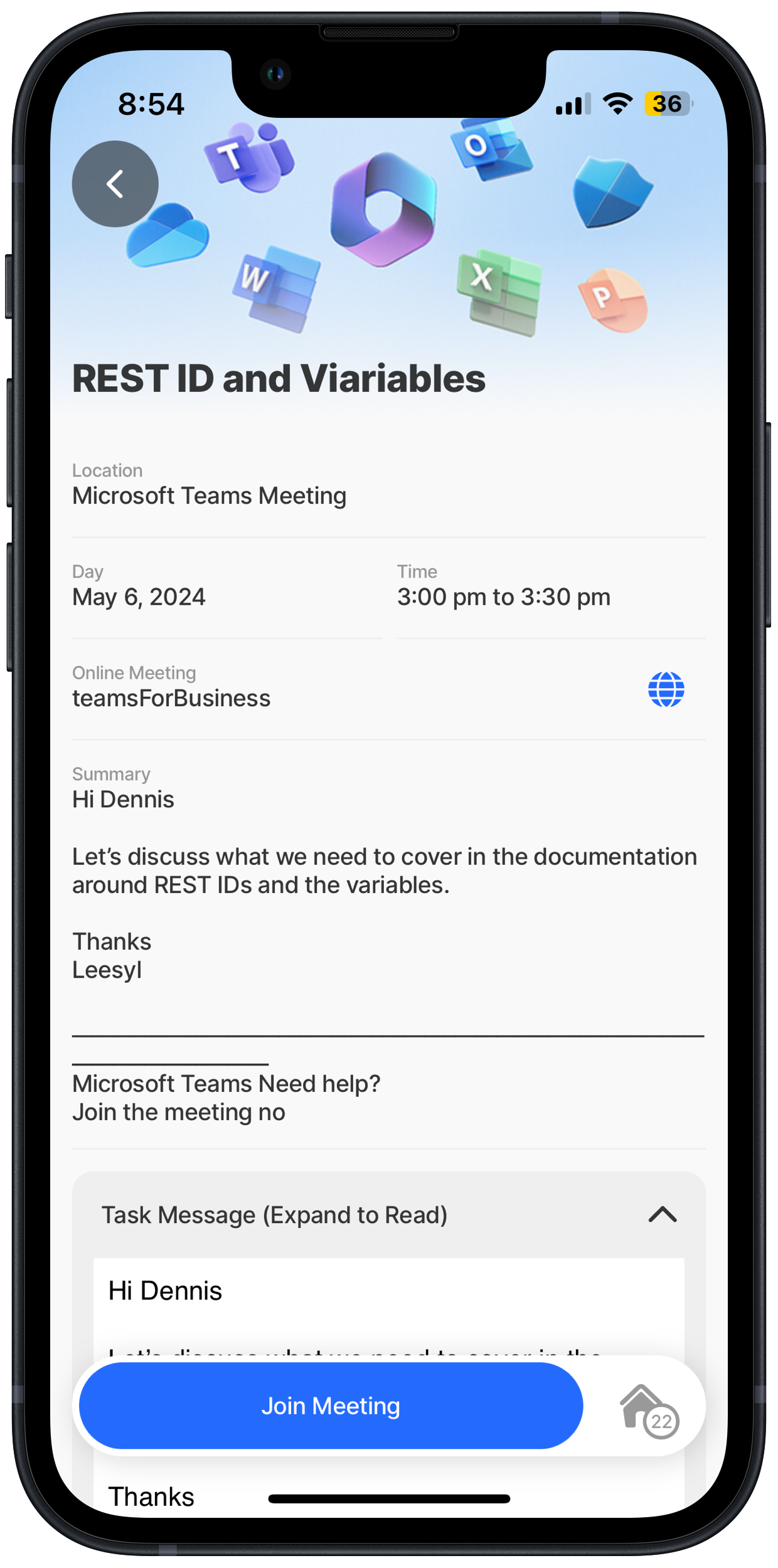
This example uses [Get Calendar List](/examples/readme/data-providers/rest/ms-graph/graph-calendar/get-calendar-list.md) and [Get Event List](/examples/readme/data-providers/rest/ms-graph/graph-calendar/get-event-list.md) to provide the calendar id and event id input to the view-calendar-event-details jig.
{% endcolumn %}
{% column %}
Event items
{% endcolumn %}
{% endcolumns %}
## Examples and code snippets
{% hint style="success" %}
When using the code and samples in this topic, remember that they are designed to function as part of a comprehensive solution. To fully benefit from the intended functionality and ensure compatibility, it is recommended that you use the entire solution rather than selecting individual components in isolation. Alternatively, you can use these samples as a guide to understand the underlying concepts and MS Graph API, which can help you integrate similar solutions into your projects more effectively. The entire MS Graph solution is available on [GitHub](https://github.com/jigx-com/jigx-samples/tree/main/quickstart/jigx-MS-Graph-demonstrator).
{% endhint %}
## General
{% tabs %}
{% tab title="index.jigx" %}
```yaml
name: ms-graph-demonstrator
title: MS Graph Demonstrator
description: A solution using Microsoft Graph APIs .
category: business
onLoad:
type: action.execute-action
options:
action: full-sync
onRefresh:
type: action.execute-action
options:
action: full-sync
expressions:
today: =$substring($now(), 0, 10)
todayStart: =$toMillis($today)
weekdayStr: =$floor($todayStart/86400000)
weekdayNum: =($weekdayStr + 4) % 7
startOfWeek: =$todayStart - ($weekdayNum * 86400000)
thisWeek: =$startOfWeek + 604800000
next7: =$number($todayStart) + 604800000
tabs:
home:
jigId: home
icon: home
```
{% endtab %}
{% tab title="home.jigx" %}
```yaml
title: Home
type: jig.grid
children:
- type: component.grid-item
options:
size: 2x2
children:
type: component.jig-widget
options:
jigId: view-user-jigx
widgetId: profileImage
- type: component.grid-item
options:
size: 2x2
children:
type: component.jig-widget
options:
jigId: calendar-summary
widgetId: nextDays
- type: component.grid-item
when: =$boolean(@ctx.datasources.next-meeting.locationAddress)
options:
size: 4x2
children:
type: component.jig-widget
options:
jigId: next-meeting
widgetId: meeting-location
- type: component.grid-item
options:
size: 2x2
children:
type: component.jig-widget
options:
jigId: list-email-messages
- type: component.grid-item
options:
size: 2x2
children:
type: component.jig-widget
options:
jigId: list-task-lists
widgetId: taskList
- type: component.grid-item
options:
size: 4x2
children:
type: component.jig-widget
options:
jigId: items-trending
widgetId: trending
```
{% endtab %}
{% endtabs %}
## Functions
{% hint style="info" %}
We will use `forRowsWithValues` in the get-calendar-event-details function to update only one record in the calendarEvents table when called from `onRefresh` on the view-calendar-event-details jig. If you don't specify `forRowsWithValues` the entire table is wiped by the REST call and only the result is inserted. See [REST Overview](https://docs.jigx.com/building-apps-with-jigx/data/data-providers/rest) for more information on using `forRowsWithValues` with REST calls.
{% endhint %}
MS Graph Event Item function in [GitHub](https://github.com/jigx-com/jigx-samples/blob/main/quickstart/jigx-MS-Graph-demonstrator/functions/calendar/get-calendar-event-details.jigx).
{% code title="get-calendar-events-details.jigx" %}
```yaml
provider: DATA_PROVIDER_REST
method: GET
url: https://graph.microsoft.com/v1.0/users/{userId}/calendars/{calendarId}/events/{calendarEventId}
outputTransform: $
parameters:
accessToken:
location: header
required: true
type: string
value: microsoft.OAuth # Use manage.jigx.com to define credentials for your solution
userId:
type: string
location: path
required: true
calendarId:
type: string
location: path
required: true
calendarEventId:
type: string
location: path
required: true
forRowsWithValues:
id: calendarEventId
```
{% endcode %}
## Jigs
MS Graph Calendar Events jig in [GitHub](https://github.com/jigx-com/jigx-samples/blob/main/quickstart/jigx-MS-Graph-demonstrator/jigs/calendar/view-calendar-events.jigx).
{% code title="view-calendar-event-details" %}
```yaml
title: =@ctx.jig.inputs.subject
type: jig.default
header:
type: component.jig-header
options:
height: small
children:
type: component.image
options:
source:
uri: https://support.content.office.net/en-us/media/f1c4b693-4670-4e7a-8102-bbf1749e83fe.jpg
children:
- type: component.entity
options:
children:
- type: component.entity-field
options:
label: Location
value: =@ctx.jig.inputs.locationDisplayName
- type: component.field-row
options:
children:
- type: component.entity-field
options:
label: Day
value: =$fromMillis($toMillis(@ctx.jig.inputs.evtFrom), '[MNn] [D], [Y]', @ctx.system.timezone.offset)
- type: component.entity-field
options:
label: Time
value: |
= $fromMillis($toMillis(@ctx.jig.inputs.evtFrom), '[h]:[m01] [PN]', @ctx.system.timezone.offset)
& " to " &
$fromMillis($toMillis(@ctx.jig.inputs.evtTo), '[h]:[m01] [PN]', @ctx.system.timezone.offset)
- type: component.entity-field
options:
label: Online Meeting
value: =@ctx.jig.inputs.onlineMeetingProvider
contentType: link
href: =@ctx.jig.inputs.onlineMeetingUrl
isTrackingTransparencyRequired: false
isHidden: =@ctx.jig.inputs.isOnlineMeeting? false:true
- type: component.entity-field
options:
label: Summary
value: =@ctx.jig.inputs.bodyPreview
isMultiline: true
- type: component.expander
options:
isInitiallyCollapsed: true
header:
centerElement:
type: component.titles
options:
title: Task Message (Expand to Read)
children:
- type: component.web-view
options:
isTrackingTransparencyRequired: false
height: 400
content: |
=("
"
& @ctx.jig.inputs.bodyContent
& "
")
- type: component.list
options:
data: =@ctx.jig.inputs.attendees
maximumItemsToRender: 8
item:
type: component.list-item
options:
title: =@ctx.current.item.emailAddress.name
divider: solid
subtitle: "='Status: ' & @ctx.current.item.status.response"
label:
title: =@ctx.current.item.type
color:
- when: =@ctx.current.item.type = 'required'
color: color2
- when: =@ctx.current.item.type != 'required'
color: color7
leftElement:
element: avatar
text: =$uppercase(@ctx.current.item.emailAddress.name)
actions:
- children:
- type: action.open-url
options:
title: Join Meeting
url: =@ctx.jig.inputs.onlineMeetingUrl
isHidden: |
=@ctx.jig.inputs.isOnlineMeeting? false: true
preview:
header:
type: component.jig-header
options:
height: small
children:
type: component.image
options:
source:
uri: https://support.content.office.net/en-us/media/f1c4b693-4670-4e7a-8102-bbf1749e83fe.jpg
isCompact: false
children:
- type: component.entity
options:
children:
- type: component.entity-field
options:
label: Subject
value: =@ctx.jig.inputs.subject
contentType: default
- type: component.field-row
options:
children:
- type: component.entity-field
options:
label: Day
value: =$fromMillis($toMillis(@ctx.jig.inputs.evtFrom), '[MNn] [D], [Y]', @ctx.system.timezone.offset)
- type: component.entity-field
options:
label: Time
value: |
= $fromMillis($toMillis(@ctx.jig.inputs.evtFrom), '[h]:[m01] [PN]', @ctx.system.timezone.offset)
& " to " &
$fromMillis($toMillis(@ctx.jig.inputs.evtTo), '[h]:[m01] [PN]', @ctx.system.timezone.offset)
- type: component.entity-field
options:
label: Summary
value: =@ctx.jig.inputs.bodyPreview
isMultiline: true
- type: component.web-view
options:
isTrackingTransparencyRequired: false
height: 400
content: |
=("
"
& @ctx.jig.inputs.bodyContent
& "
")
actions:
# - when: =@ctx.jig.inputs.isOnlineMeeting = 1
- children:
- type: action.open-url
options:
title: Join Meeting
url: =@ctx.jig.inputs.onlineMeetingUrl
isHidden: |
=@ctx.jig.inputs.isOnlineMeeting? false: true
```
{% endcode %}
## See Also
* [Get Event List](/examples/readme/data-providers/rest/ms-graph/graph-calendar/get-event-list.md)
* [Get Calendar List](/examples/readme/data-providers/rest/ms-graph/graph-calendar/get-calendar-list.md)
* [Create Event Item](/examples/readme/data-providers/rest/ms-graph/graph-calendar/create-event-item.md)
---
# Agent Instructions
This documentation is published with GitBook. GitBook is the documentation platform designed so that both humans and AI agents can read, navigate, and reason over technical content effectively. Learn more at gitbook.com.
## Querying This Documentation
If you need additional information that is not directly available in this page, you can query the documentation by asking a question.
Perform an HTTP GET request on the following URL with the `ask` and `goal` query parameters:
```
GET https://docs.jigx.com/examples/readme/data-providers/rest/ms-graph/graph-calendar/get-event-item.md?ask=&goal=
```
`ask` is the immediate question: it should be specific, self-contained, and written in natural language.
`goal` is what the user is ultimately trying to achieve, the reason they need the answer. Sharing it helps GitBook give you a better, more relevant answer. A goal is most helpful when it describes the outcome the user wants rather than restating the question. For example, with `ask=how do I create an API token`, a goal like `automate deployments from our CI pipeline` lets GitBook tailor the answer to that use case.
The response will contain a direct answer to the question and relevant excerpts and sources from the documentation.
Use this mechanism when the answer is not explicitly present in the current page, you need clarification or additional context, or you want to retrieve related documentation sections.