print

This feature enables you to generate hard copies of invoices, receipts, articles, or any rendered content in raw HTML, providing a smooth, native experience that works across different devices and printers.

Print HTML action
Print HTML action

Configuration options

Some properties are common to all components, see Common component properties for a list and their configuration options.

Core structure

title

Provide the action button with a title, for example, Print.

html

Use standard HTML elements to ensure optimal formatting and compatibility when rendering content for printing, for example, <html><body>Invoices are provided monthly.</body</html>. The HTML can be built up using JSONata or JavaScript.

Other options

icon

Select an to display when the action is configured as the secondary button or in a header action.

isHidden

true hides the action button, false shows the action button. Default setting is false.

styles

  • isDanger - Styles the action button in red or your brand's designated danger color.

  • isDisabled - Displays the action button as greyed out.

  • isPrimary - Styles the action button in blue or your brand's designated primary color.

  • isSecondary - Sets the action as a secondary button, accessible via the ellipsis. The icon property can be used when the action button is displayed as a secondary button.

Considerations

  • The action.print requires raw HTML. This can be configured in the action, in an expression, or in JavaScript.

Examples and code snippets

Basic print action

Print HTML
Print HTML

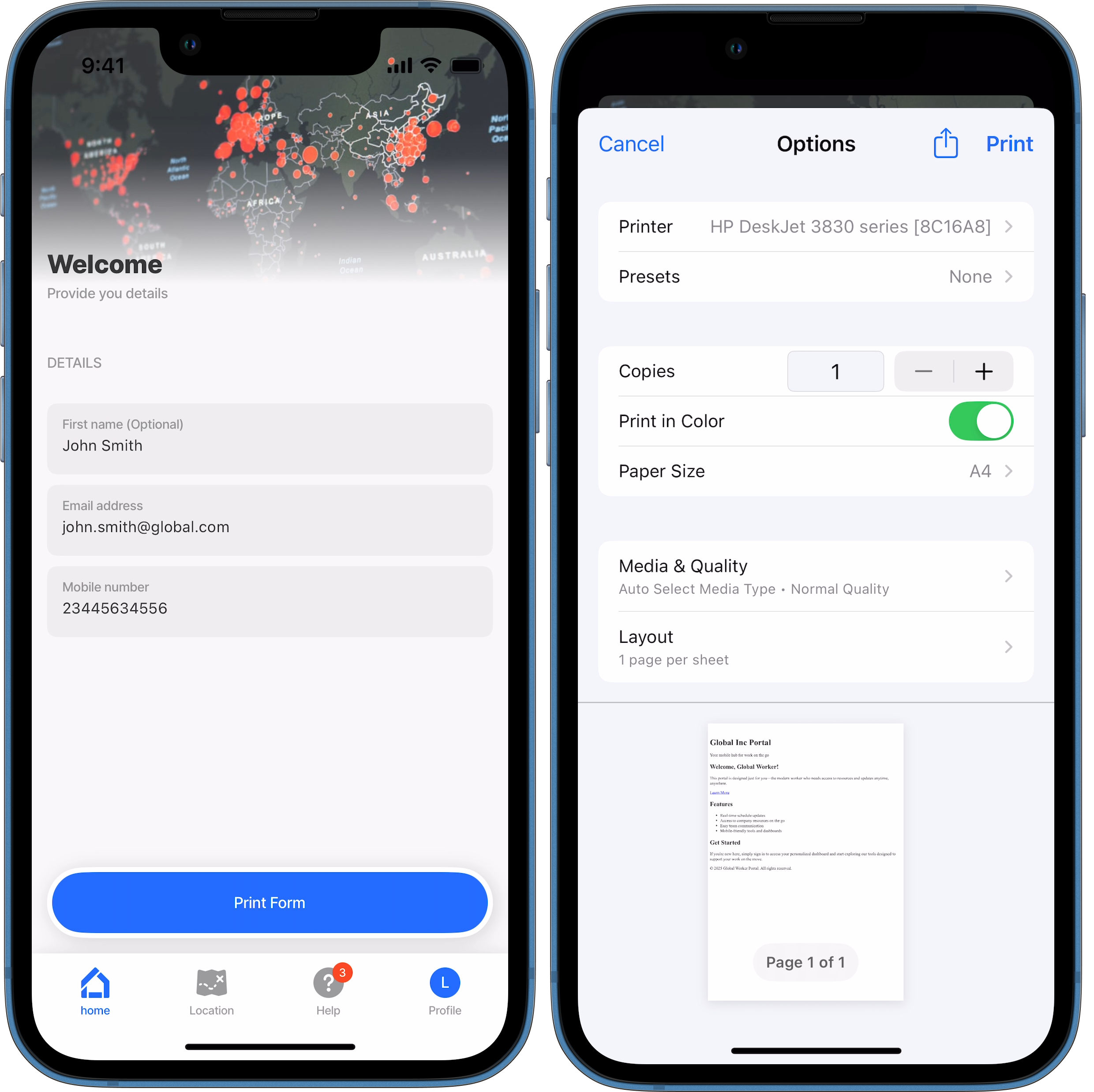
This example demonstrates configuring action.print to display a button for printing HTML content.

action-print-basic.jigx
title: Welcome
description: Provide you details
type: jig.default

header:
  type: component.jig-header
  options:
    height: small
    children:
      type: component.image
      options:
        source:
          uri: https://images.unsplash.com/photo-1584931423298-c576fda54bd2?w=800&auto=format&fit=crop&q=60&ixlib=rb-4.0.3&ixid=M3wxMjA3fDB8MHxzZWFyY2h8MTR8fGdsb2JhbHxlbnwwfHwwfHx8MA%3D%3D

children:
  - type: component.section
    options:
      title: Details
      children:
        - type: component.form
          instanceId: inputValues
          options:
            children:
              - type: component.text-field
                instanceId: firstName
                options:
                  initialValue: John Smith
                  label: First name
                  isRequired: false
              - type: component.email-field
                instanceId: email
                options:
                  initialValue: [email protected]
                  label: Email address
              - type: component.number-field
                instanceId: phoneNumber
                options:
                  initialValue: 23445634556
                  label: Mobile number

actions:
  - children:
      # Add the print action.
      - type: action.print
        options:
          # Give the action button a title.
          title: Print Form
          # Provide the HTML content to be printed.
          html: <html>
            <body>
            <header>
            <h1>Global Inc Portal</h1>
            <p>Your mobile hub for work on the go</p>
            </header>
            <main>
            <div class="container">
            <div class="card">
            <h2>Welcome, Global Worker!</h2>
            <p>This portal is designed just for you—the modern worker who needs access to resources and updates anytime, anywhere.</p>
            <a href="https://jigx.com/" class="cta-button">Learn More</a>
            </div>
            <div class="card" id="features">
            <h2>Features</h2>
            <ul>
            <li>Real-time schedule updates</li>
            <li>Access to company resources on the go</li>
            <li>Easy team communication</li>
            <li>Mobile-friendly tools and dashboards</li>
            </ul>
            </div>
            <div class="card">
            <h2>Get Started</h2>
            <p>If you're new here, simply sign in to access your personalized dashboard and start exploring our tools designed to support your work on the move.</p>
            </div>
            </div>
            </main>
            <footer>
            <p>&copy; 2025 Global Worker Portal. All rights reserved.</p>
            </footer>
            </body>
            </html>

This example demonstrates configuring action.print to display a button for printing HTML content shown in the component.web-view. The state of the component is used to reference the raw HTML used in the component.

action-print-web-view.jigx
title: Jigx Frontline
type: jig.default

children:
  - type: component.web-view
    instanceId: demo
    options:
      height: 1000
      content: |
        <!DOCTYPE html>
               <html lang="en">
               <head>
                   <meta charset="UTF-8">
                   <meta name="viewport" content="width=device-width, initial-scale=1.0">
                   <title>Mobile App Company</title>
                   <style>
                       * {
                           margin: 0;
                           padding: 0;
                           box-sizing: border-box;
                           font-family: 'Arial', sans-serif;
                       }
                       body {
                           background: linear-gradient(135deg, #001a33, #66b3ff, #99ccff, #cce6ff);
                           color: #fff;
                           text-align: center;
                       }
                       .container {
                           padding: 50px 20px;
                       }
                       .logo {
                           font-size: 2.5em;
                           font-weight: bold;
                           background: linear-gradient(45deg, #ff6a00, #ffa366);
                           -webkit-background-clip: text;
                           -webkit-text-fill-color: transparent;
                       }
                       .hero {
                           margin-top: 20px;
                           font-size: 1.5em;
                       }
                       .features {
                           display: flex;
                           justify-content: center;
                           flex-wrap: wrap;
                           margin-top: 30px;
                       }
                       .feature-box {
                           background: rgba(255, 255, 255, 0.2);
                           backdrop-filter: blur(10px);
                           padding: 20px;
                           border-radius: 12px;
                           margin: 10px;
                           width: 250px;
                           transition: transform 0.3s ease-in-out;
                       }
                       .feature-box:hover {
                           transform: translateY(-5px);
                       }
                       .cta-button {
                           display: inline-block;
                           background: #ff6a00;
                           color: #fff;
                           padding: 12px 24px;
                           margin-top: 20px;
                           text-decoration: none;
                           font-weight: bold;
                           border-radius: 8px;
                           transition: background 0.3s;
                       }
                       .cta-button:hover {
                           background: #ee0979;
                       }
                   </style>
               </head>
               <body>

                   <div class="container">
                       <div class="logo">Frontline</div>
                       <p class="hero">Innovative Mobile Solutions for a Connected World</p>

                       <div class="features">
                           <div class="feature-box">
                               <h3>🚀 Fast Performance</h3>
                               <p>Optimized for speed and efficiency.</p>
                           </div>
                           <div class="feature-box">
                               <h3>🎨 Stunning UI</h3>
                               <p>Beautiful and user-friendly interfaces.</p>
                           </div>
                           <div class="feature-box">
                               <h3>🔒 Secure</h3>
                               <p>Built with industry-leading security standards.</p>
                           </div>
                       </div>

                       <a href="https://jigx.com/" class="cta-button">Get Started</a>
                   </div>
               </body>
               </html>
# Add the print action that uses the raw HTML from the web-view component,
# by referencing the state of the component.
actions:
  - children:
      - type: action.print
        options:
          title: Print demo form
          html: [email protected]

Document jig with print action

Print from a document jig

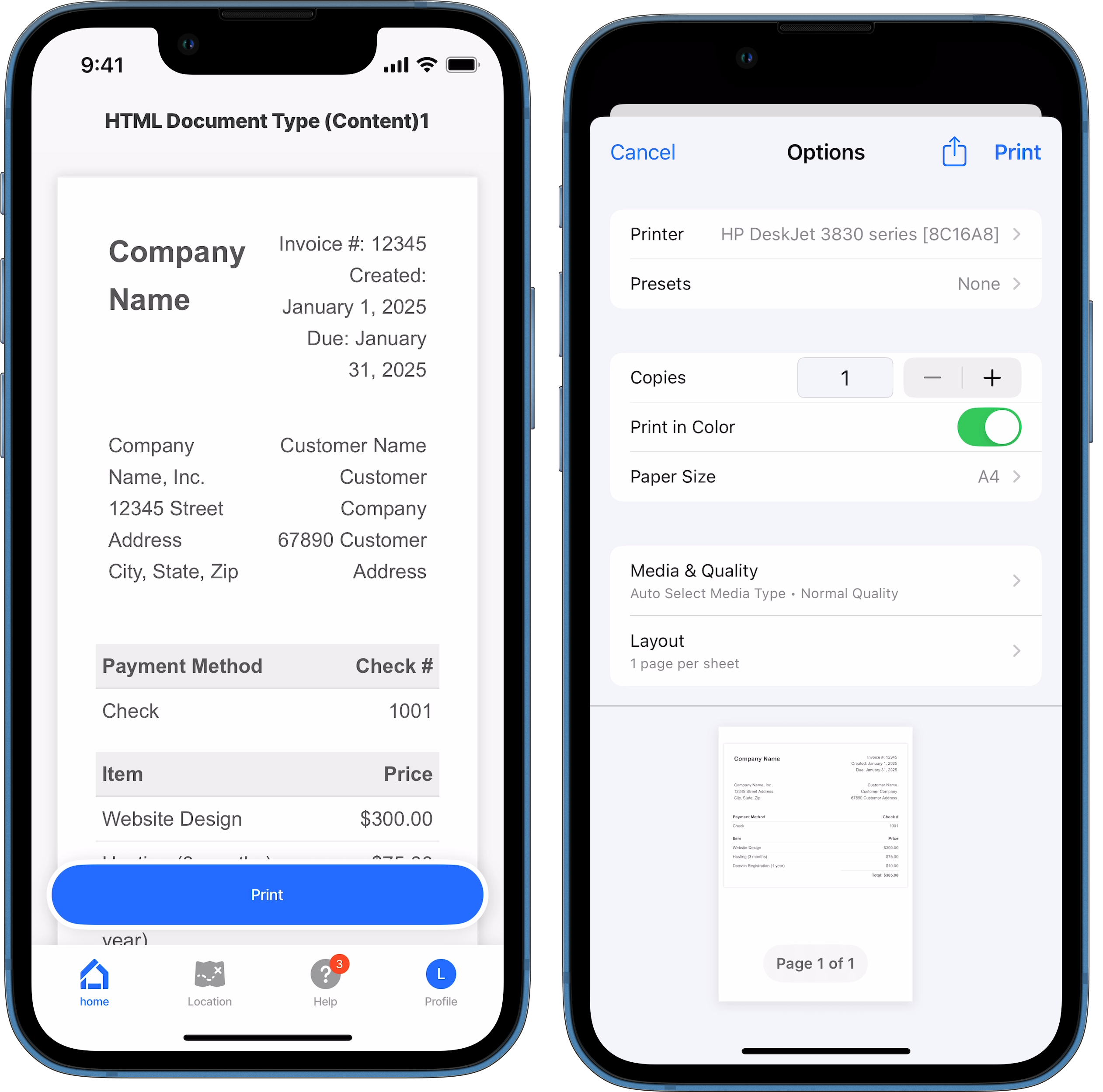
This example demonstrates configuring action.print to display a button for printing raw HTML content from a jig.document type.

action.print-document-jig.jigx
title: HTML Document Type (Content)
type: jig.document
# Display an HTML page as the document in the jig.
source:
  documentType: HTML
  # Add the raw HTML to the content property.
  content: |
    <!DOCTYPE html>
     <html lang="en">
     <head>
       <meta charset="UTF-8">
       <meta name="viewport" content="width=device-width, initial-scale=1.0">
       <title>Invoice</title>
       <style>
         body {
           font-family: 'Arial', sans-serif;
           margin: 0;
           padding: 20px;
           background-color: #f6f6f6;
         }
         .invoice-box {
           max-width: 800px;
           margin: auto;
           padding: 30px;
           border: 1px solid #eee;
           box-shadow: 0 0 10px rgba(0, 0, 0, 0.15);
           background-color: #fff;
           color: #555;
         }
         .invoice-box table {
           width: 100%;
           line-height: 1.6;
           text-align: left;
           border-collapse: collapse;
         }
         .invoice-box table td {
           padding: 5px;
           vertical-align: top;
         }
         .invoice-box table tr td:nth-child(2) {
           text-align: right;
         }
         .invoice-box table tr.top table td {
           padding-bottom: 20px;
         }
         .invoice-box table tr.information table td {
           padding-bottom: 40px;
         }
         .invoice-box table tr.heading td {
           background: #eee;
           border-bottom: 1px solid #ddd;
           font-weight: bold;
         }
         .invoice-box table tr.details td {
           padding-bottom: 20px;
         }
         .invoice-box table tr.item td {
           border-bottom: 1px solid #eee;
         }
         .invoice-box table tr.item.last td {
           border-bottom: none;
         }
         .invoice-box table tr.total td:nth-child(2) {
           border-top: 2px solid #eee;
           font-weight: bold;
         }
         h2, h3 {
           margin: 0;
         }
       </style>
     </head>
     <body>
       <div class="invoice-box">
         <table cellpadding="0" cellspacing="0">
           <!-- Invoice Header -->
           <tr class="top">
             <td colspan="2">
               <table>
                 <tr>
                   <td class="title">
                     <h2>Company Name</h2>
                   </td>
                   <td>
                     Invoice #: 12345<br>
                     Created: January 1, 2025<br>
                     Due: January 31, 2025
                   </td>
                 </tr>
               </table>
             </td>
           </tr>
           <!-- Company & Customer Information -->
           <tr class="information">
             <td colspan="2">
               <table>
                 <tr>
                   <td>
                     Company Name, Inc.<br>
                     12345 Street Address<br>
                     City, State, Zip
                   </td>
                   <td>
                     Customer Name<br>
                     Customer Company<br>
                     67890 Customer Address
                   </td>
                 </tr>
               </table>
             </td>
           </tr>
           <!-- Payment Method Details -->
           <tr class="heading">
             <td>Payment Method</td>
             <td>Check #</td>
           </tr>
           <tr class="details">
             <td>Check</td>
             <td>1001</td>
           </tr>
           <!-- Itemized List of Services/Products -->
           <tr class="heading">
             <td>Item</td>
             <td>Price</td>
           </tr>
           <tr class="item">
             <td>Website Design</td>
             <td>$300.00</td>
           </tr>
           <tr class="item">
             <td>Hosting (3 months)</td>
             <td>$75.00</td>
           </tr>
           <tr class="item last">
             <td>Domain Registration (1 year)</td>
             <td>$10.00</td>
           </tr>
           <!-- Total -->
           <tr class="total">
             <td></td>
             <td>Total: $385.00</td>
           </tr>
         </table>
       </div>
     </body>
     </html>

actions:
  - children:
      # Add an action button to print the document
      - type: action.print
        options:
          title: Print
          # Add the same raw HTML as provided in the content property above.
          html: |
            <!DOCTYPE html>
              <html lang="en">
              <head>
                <meta charset="UTF-8">
                <meta name="viewport" content="width=device-width, initial-scale=1.0">
                <title>Invoice</title>
                <style>
                  body {
                    font-family: 'Arial', sans-serif;
                    margin: 0;
                    padding: 20px;
                    background-color: #f6f6f6;
                  }
                  .invoice-box {
                    max-width: 800px;
                    margin: auto;
                    padding: 30px;
                    border: 1px solid #eee;
                    box-shadow: 0 0 10px rgba(0, 0, 0, 0.15);
                    background-color: #fff;
                    color: #555;
                  }
                  .invoice-box table {
                    width: 100%;
                    line-height: 1.6;
                    text-align: left;
                    border-collapse: collapse;
                  }
                  .invoice-box table td {
                    padding: 5px;
                    vertical-align: top;
                  }
                  .invoice-box table tr td:nth-child(2) {
                    text-align: right;
                  }
                  .invoice-box table tr.top table td {
                    padding-bottom: 20px;
                  }
                  .invoice-box table tr.information table td {
                    padding-bottom: 40px;
                  }
                  .invoice-box table tr.heading td {
                    background: #eee;
                    border-bottom: 1px solid #ddd;
                    font-weight: bold;
                  }
                  .invoice-box table tr.details td {
                    padding-bottom: 20px;
                  }
                  .invoice-box table tr.item td {
                    border-bottom: 1px solid #eee;
                  }
                  .invoice-box table tr.item.last td {
                    border-bottom: none;
                  }
                  .invoice-box table tr.total td:nth-child(2) {
                    border-top: 2px solid #eee;
                    font-weight: bold;
                  }
                  h2, h3 {
                    margin: 0;
                  }
                </style>
              </head>
              <body>
                <div class="invoice-box">
                  <table cellpadding="0" cellspacing="0">
                    <!-- Invoice Header -->
                    <tr class="top">
                      <td colspan="2">
                        <table>
                          <tr>
                            <td class="title">
                              <h2>Company Name</h2>
                            </td>
                            <td>
                              Invoice #: 12345<br>
                              Created: January 1, 2025<br>
                              Due: January 31, 2025
                            </td>
                          </tr>
                        </table>
                      </td>
                    </tr>
                    <!-- Company & Customer Information -->
                    <tr class="information">
                      <td colspan="2">
                        <table>
                          <tr>
                            <td>
                              Company Name, Inc.<br>
                              12345 Street Address<br>
                              City, State, Zip
                            </td>
                            <td>
                              Customer Name<br>
                              Customer Company<br>
                              67890 Customer Address
                            </td>
                          </tr>
                        </table>
                      </td>
                    </tr>
                    <!-- Payment Method Details -->
                    <tr class="heading">
                      <td>Payment Method</td>
                      <td>Check #</td>
                    </tr>
                    <tr class="details">
                      <td>Check</td>
                      <td>1001</td>
                    </tr>
                    <!-- Itemized List of Services/Products -->
                    <tr class="heading">
                      <td>Item</td>
                      <td>Price</td>
                    </tr>
                    <tr class="item">
                      <td>Website Design</td>
                      <td>$300.00</td>
                    </tr>
                    <tr class="item">
                      <td>Hosting (3 months)</td>
                      <td>$75.00</td>
                    </tr>
                    <tr class="item last">
                      <td>Domain Registration (1 year)</td>
                      <td>$10.00</td>
                    </tr>
                    <!-- Total -->
                    <tr class="total">
                      <td></td>
                      <td>Total: $385.00</td>
                    </tr>
                  </table>
                </div>
              </body>
              </html>
Print from the header

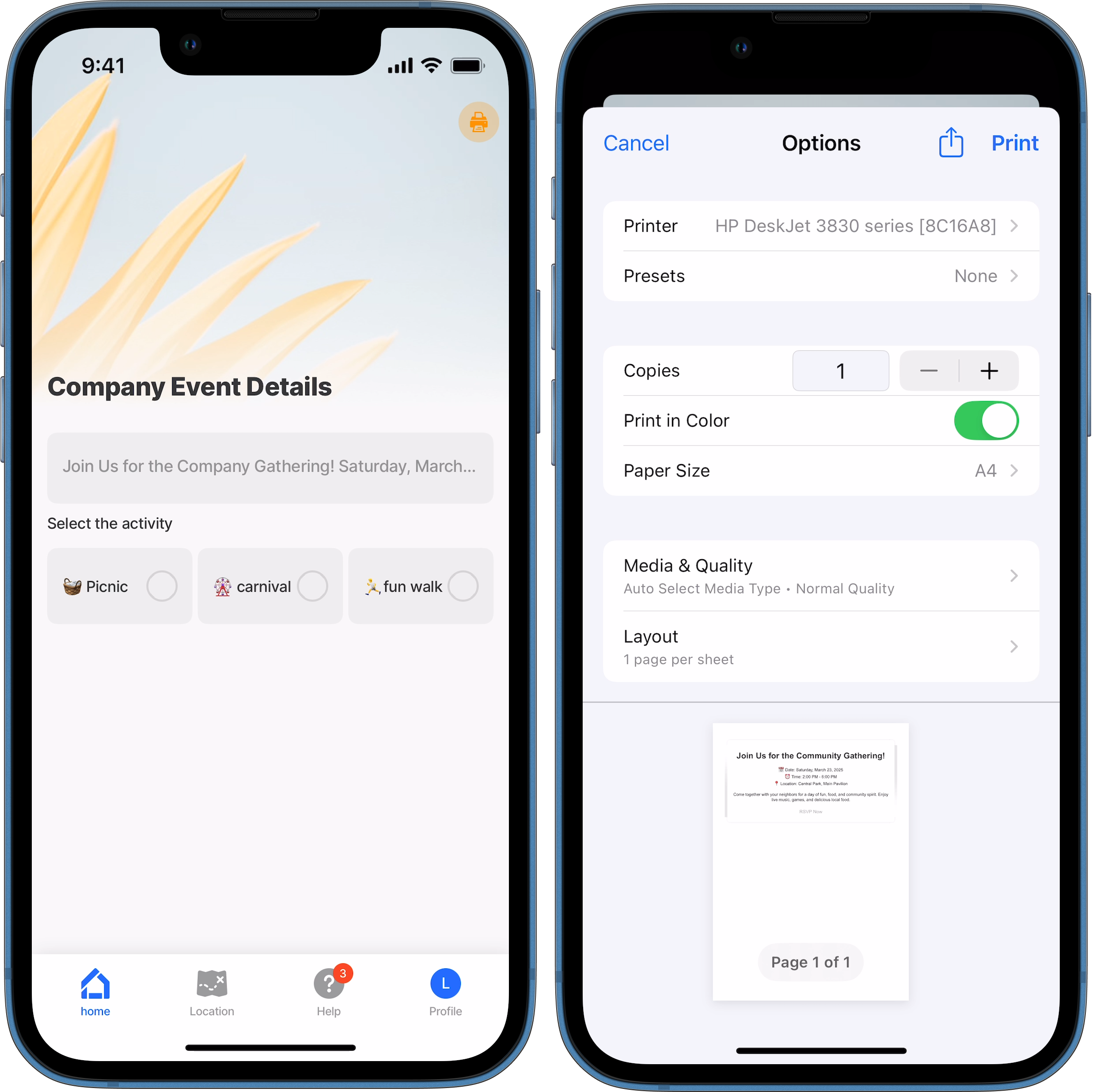
This example demonstrates configuring action.print in the jig.header. A print icon is used to trigger the action. The raw HTML content is configured in the action.print.

title: Company Event Details
type: jig.default

header:
  type: component.jig-header
  options:
    height: medium
    children:
      type: component.image
      options:
        source:
          uri: https://images.unsplash.com/photo-1531736275454-adc48d079ce9?w=800&auto=format&fit=crop&q=60&ixlib=rb-4.0.3&ixid=M3wxMjA3fDB8MHxzZWFyY2h8MTZ8fGxpZ2h0JTIwY29sb3IlMjBiYWNrZ3JvdW5kfGVufDB8fDB8fHww
    # Add the print action in the header, this displays at the top right of the 
    # screen. Add a print icon to the action rather than a link.
    actions:
      - type: action.print
        options:
          icon: printer-computers
          style:
            isSecondary: true
          title: Print Event
          # Configure the raw HTML to print when the action is triggered.
          html: |
            <!DOCTYPE html>
            <html lang="en">
            <head>
                <meta charset="UTF-8">
                <meta name="viewport" content="width=device-width, initial-scale=1.0">
                <title>Community Event</title>
                <style>
                    body {
                        font-family: Arial, sans-serif;
                        margin: 0;
                        padding: 0;
                        background-color: #f4f4f4;
                        text-align: center;
                    }
                    .container {
                        width: 80%;
                        margin: 20px auto;
                        background: white;
                        padding: 20px;
                        border-radius: 10px;
                        box-shadow: 0 0 10px rgba(0,0,0,0.1);
                    }
                    h1 {
                        color: #333;
                    }
                    .event-details {
                        margin: 20px 0;
                    }
                    .cta {
                        display: inline-block;
                        padding: 10px 20px;
                        background: #28a745;
                        color: white;
                        text-decoration: none;
                        border-radius: 5px;
                        font-size: 18px;
                    }
                </style>
            </head>
            <body>
                <div class="container">
                    <h1>Join Us for the Community Gathering!</h1>
                    <p class="event-details">📅 Date: Saturday, March 23, 2025<br>
                      ⏰ Time: 2:00 PM - 6:00 PM<br>
                      📍 Location: Central Park, Main Pavilion</p>
                    <p>Come together with your neighbors for a day of fun, food, and community spirit. Enjoy live music, games, and delicious local food.</p>
                    <a href="#" class="cta">RSVP Now</a>
                </div>
            </body>
            </html>

children:
  - type: component.form
    instanceId: company-event
    options:
      isDiscardChangesAlertEnabled: false
      children:
        - type: component.text-field
          instanceId: event-label
          options:
            label: |
              Join Us for the Company Gathering! Saturday, March 23, 2025
              Time 2:00 PM - 6:00 PM
              Location Central Park, Main Pavilion
              Come together with your family for a day of fun, food, and good spirit. Enjoy live music, games, and delicious local food.
        - type: component.choice-field
          instanceId: event
          options:
            itemsPerRow: 3
            label: Select the activity
            data: [email protected]
            item:
              type: component.choice-field-item
              options:
                title: [email protected]
                value: [email protected]

Last updated

Was this helpful?