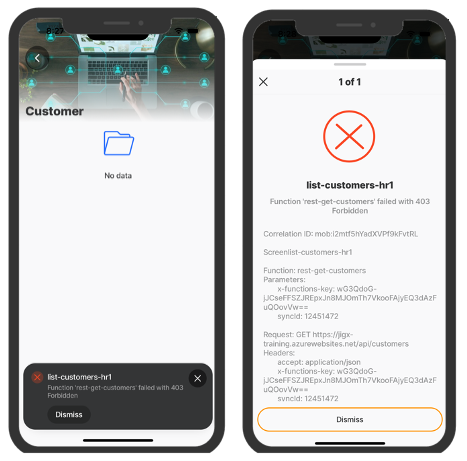
REST error handling
REST errors returned by the endpoints in an app are often too technical for end-users to comprehend. Jigx allows you to customize these error messages to improve user experience, communicate more effectively, and ensure users understand that errors are not their fault. By configuring custom error handling, you can:
Suppress or customize default error messages.
Log error details for more effective debugging.
Create more robust and user-friendly error solutions.
Key features
Custom error messages: Control the message shown to users when a REST error occurs.
User-friendly retry options: Allow users to retry an action when an error occurs.
By default, Jigx automatically catches any 429 error responses and retries the request up to three times, with a five-second delay between each attempt.
By default, Jigx automatically catches any 401 error responses and retries the request up to three times.
Error logging: Automatically log error details for debugging.
Dynamic responses: Build logic to respond to specific errors flexibly.


How does it work
In Jigx, REST error handling is configured through an error section in the REST function. This allows the system to catch various error responses and act accordingly:
Multiple error responses can be defined and are evaluated in sequence.
Error responses can trigger notifications, log errors, or provide retry options for users.
The app supports customized messaging for each error type.
Expressions are supported in functions.
High level steps:
Configure the
errorsection in the REST function to customize the error message and configure an error table.Create a datasource for the error table.
Create a UI (jig) to process the error in the queue using the commandQueue actions.
REST Function
In the Jigx function, configure the error section to cater for:
Customizing the error message.
Determining if a toast notification is required or not.
Writing the context of the error to a table for debugging and configuring actions to fix the error.
Multiple error handlers can be added in the function, which are executed from the top to bottom until one matches. The error section needs to be configured in each of the individual REST function files.

Configuration properties
The following properties are available for configuration when handling REST errors:
description
Provide a user-friendly message of the error, for example, "It looks like our system is unavailable." Defaults to the provider's description if absent. For example, the REST provider uses the HTTP status code and message. The description property supports localization.
details
Add additional information that will display under the description. Defaults to the provider's details if absent.
icon
Select an icon to show on the error notification screen.
notification
Determines whether the notification should be shown on the device. (true/false)
retry
Provides the ability to configure an automatic retry, set a delay time before the retry is executed and specify the maximum number of retries allowed. By default, Jigx automatically handles 429 (Too Many Requests) error responses for CRUD and sync methods by retrying the request up to three times, with a five-second delay between each attempt. If the request still fails after the third retry, the error is raised in the app. You can customize this behavior by configuring the handling of the 429 status in the error property.
table
Define a table where the error information specified in the transform property will be logged to, for example: table: [email protected] & "_error"
title
Title that displays on the toast notification. Defaults to the provider's title if not provided. The title property supports localization.
transform
Specifies the details to log in the table for the error, such as the request, response, and user context, for example: '={ "id": @ctx.commandId, "type": "System Offline",
"screen": "system-offline", "response": @ctx.response, "request": @ctx.request, "user": @ctx.user, "solution": @ctx.solution, "entity": @ctx.entity, "correlationId": @ctx.correlationId}'
when
Checks if the result of the function is an error, the first one that resolves to true is used. - The REST provider uses a combination of actual errors encountered and the HTTP status code and message. Configure different types of actions depending on the error received, by using multiple when statements. If the property is not configured it defaults to the REST provider's default error check.
Example configuration:
# Configure an error section in each function file for REST endpoint,
# where errors can occur.
error:
- when: [email protected] = 403
title: System Offline
description: It looks like our system is temporarily unavailable.
We're working hard to fix this and get things back on
track. Please try again in a little while. Thank you
for your patience!
# Set an automatic retry, specify the delay before the retry is actioned,
# Set the number of retries allowed.
retry:
delay: "=(@.response.headers.'retry-after' ? $number(@.response.headers.'retry-after') : 5)*1000"
maxRetries: 3
details: [email protected]
icon: server-error-403-hand-forbidden
notification: false
table: datasync-error
transform: '={ "id": @ctx.parameters.syncId, "type": "System Offline",
"screen": "system-offline", "response": @ctx.response,
"request": @ctx.request, "user": @ctx.user, "solution": @ctx.solution,
"entity": @ctx.entity, "correlationId": @ctx.correlationId}'Error logging
Logging errors is a crucial part of the error handling mechanism. Errors are logged into a dedicated error table defined by you, capturing key information for debugging and analysis. Take the information that you currently have in the context of the function and log it to the table by defining the data to be logged in the transform property.
The full error coming back from the backend system should be logged.
Expose error tables in Jigx Builder to help with troubleshooting.
Define a datasource against the error tables.
Error logging configuration:
When configuring REST errors, several system expressions and variables can be used. These variables allow you to dynamically log and handle errors based on the context of the function call.The following context is available to write to the error table, using [email protected]:
commandId
Unique id logged for the item on the commandQueue. The id matches the id in the entity table.
correlationId
The unique identifier that appears in the app. It is used in troubleshooting to help identify specific entries in the logs and to follow the user's journey while using the solution in the app. By filtering logs using this ID, you can troubleshoot issues more effectively.
entity
The specified table where the error context is logged
error
message: string
title: string
description: string
details: string
icon: string
table: string
notification: boolean
parameters
Specify any of the parameters in the function to be logged to the error table.
request
method: string
url: string
headers: Record<string, string>
body:string
Buffer
response
ok: boolean
status: number
statusText: string
headers: Record<string, string>
body: any
solution
id: SolutionId
name: SolutionName
organizationId: OrganizationId
settings:
custom: Record<string, unknown>
user
id: string
email: string
displayName: string
avatarUrl: string
phone: string
isVerified: boolean
settings: Record<string, unknown>
# Configure the error table and the data to log to the table,
# in the error section of the function.
table: [email protected] & "_error"
transform: '={ "id": @ctx.commandId, "type": "System Offline",
"screen": "system-offline", "response": @ctx.response,
"request": @ctx.request, "user": @ctx.user, "solution": @ctx.solution,
"entity": @ctx.entity, "correlationId": @ctx.correlationId}'# Call the error details from the dedicated error table in a datasource.
# Use the datasource to configure jigs to action the error, e.g. retry.
type: datasource.sqlite
options:
provider: DATA_PROVIDER_LOCAL
entities:
- entity: datasync-error
query: SELECT
id,
json_extract(err.data, '$.response.ok') as ok,
json_extract(err.data, '$.response.status') as status,
json_extract(err.data, '$.response.statusText') as statusText,
json_extract(err.data, '$.response.headers') as headers,
json_extract(err.data, '$.response.body') as body,
json_extract(err.data, '$.screen') as screen,
json_extract(err.data, '$.type') as type
FROM
[datasync-error] AS errcommandQueue table & actions
The commandQueue is a system table, when a device is offline items are queued on the table. When the device comes online the items in the queue are processed. However, if items on the queue go into error, they are not processed and remain on the queue. Errors from REST methods, except for action.sync-entity/entities are queued in the commandQueue table. The commandQueue is exposed in Jigx Dev tools, allowing you to debug . You can expose the commandQueue table in a jig and then use the commandQueue actions to interact with the queued items that are in error state by either performing a retry or delete. Take note that when syncing an item or when the device is offline the commandId is not available.

Actions
There are two actions related specifically to the commandQueue namely:
action.retry-queue-command- executes a retry of the REST function called.action.delete-queue-command- Only deletes the item from the commandQueue. The record will still be saved locally on the device. You need to provide separately for the deleting of the local data, which can be achieved through anaction.sync-entity/entitiesor executing a delete method on the local data provider.
Action configuration:
swipeable:
left:
- icon: close
label: Delete
onPress:
type: action.delete-queue-command
options:
id: [email protected]
- icon: button-refresh-arrow
label: Retry
onPress:
type: action.retry-queue-command
options:
id: [email protected]Considerations
The
commandIdmatches theidin the error table, this is important when you want to build a jig/UI to deal with the error.When using the commandQueue actions the commandQueue id (
commandId) is required.Use the error table to build a jig/UI as there is more data logged to the table than the commandQueue.

Use the _commandQueue table as a datasource in your solution. It behaves like a normal entity table with change events and updates.
When
useLocalCall: trueis set, functions that rely on secrets or other authentication mechanisms not available locally will not execute.
Examples and code snippets
See REST error example to understand how to configure error responses in a REST function, create a error table and use the commandQueue with actions to process the error.
Last updated
Was this helpful?